Components / Data display
Tree table and path bar
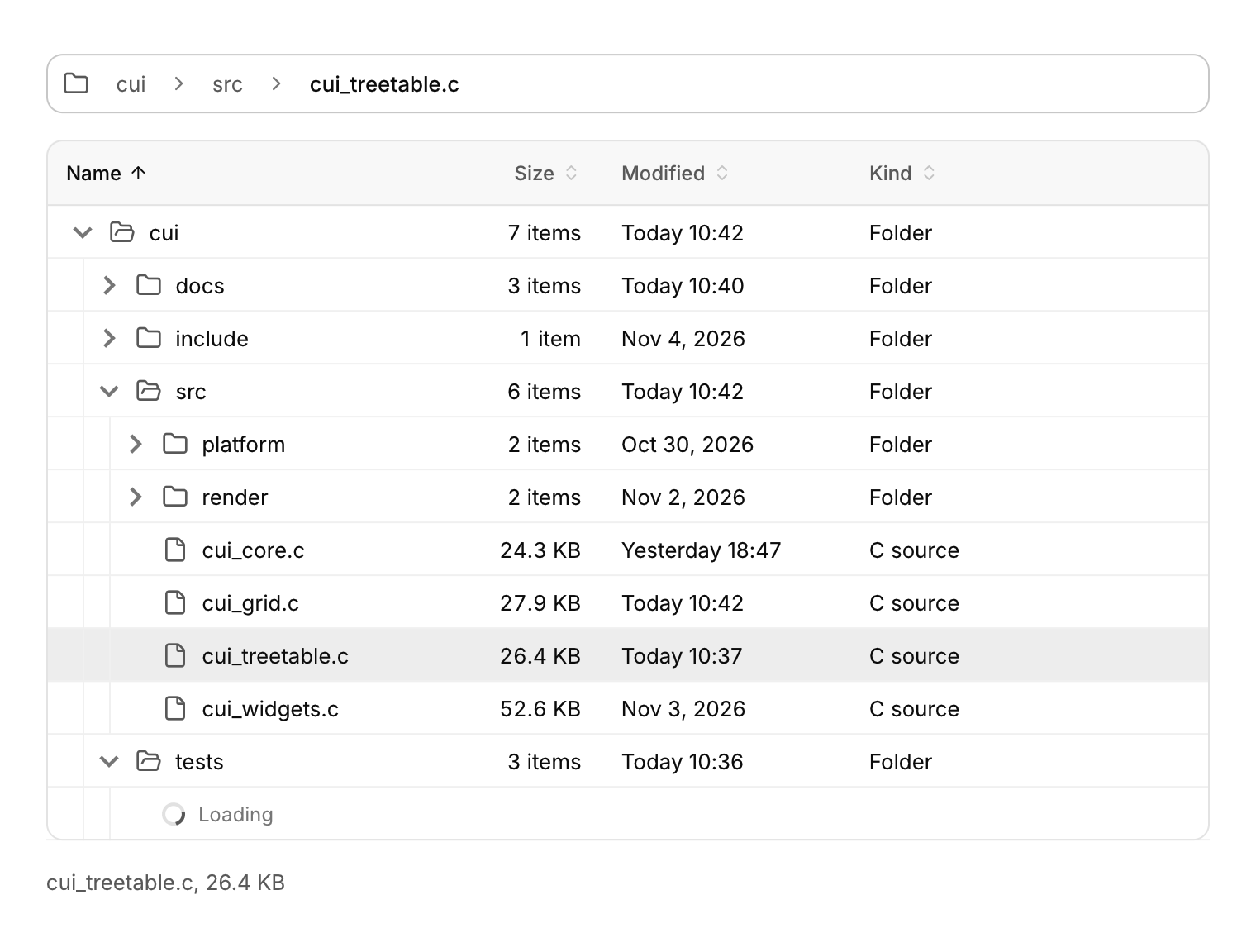
A tree with columns, as in a file explorer or a debugger's variables, and a path bar for moving up through folders.
Functions: cui_path_bar, cui_path_bar_menu_begin, cui_path_bar_menu_end, cui_tree_sort, cui_tree_table_begin, cui_tree_table_end, cui_tree_table_name, cui_tree_table_row
Usage
static cui_tree_node nodes[MAX_FILES];   /* yours: parent, first child, next sibling, flags */
static const cui_grid_column cols[] = {
    { "Name", 240, CUI_TEXT_LEFT, true }, { "Size", 96, CUI_TEXT_RIGHT, true, false, 1 },
    { "Modified", 150, CUI_TEXT_LEFT, true, false, 2 }, { "Kind", 110, CUI_TEXT_LEFT, true, false, 3 },
};
static cui_table_sort sort = { 0, false };
static int cursor = -1;

cui_path_bar_result path = cui_path_bar(ui, "path", segments, depth, .icon = CUI_ICON_FOLDER, .menus = true);
if (path.clicked >= 0) reveal(ancestor[path.clicked]);
if (path.submitted) go_to(path.submitted);
int seg;
if (cui_path_bar_menu_begin(ui, "path", &seg)) {          /* the children of segment seg */
    for (int c = nodes[ancestor[seg]].first_child; c >= 0; c = nodes[c].next_sibling)
        if (cui_menu_item(ui, files[c].name, .icon = icon_of(c))) reveal(c);
    cui_path_bar_menu_end(ui);
}

cui_tree_table_begin(ui, "files", cols, 4, nodes, count, .root = root, .sort = &sort, .cursor = &cursor, .guides = true, .label = name_of);
int n;
while ((n = cui_tree_table_row(ui)) >= 0) {
    cui_tree_table_name(ui, files[n].name, icon_of(n));
    cui_data_grid_cell_text(ui, files[n].size_text);
    cui_data_grid_cell_text(ui, files[n].modified_text);
    cui_data_grid_cell_text(ui, files[n].kind);
}
cui_tree_table_events ev = cui_tree_table_end(ui);
for (int k = 0; k < ev.load_count; k++) start_listing(ev.load[k]);   /* clear CUI_TREE_LOADING when done */
if (ev.sort_changed) root = cui_tree_sort(nodes, count, root, compare_by_sort, NULL);
if (ev.activated >= 0) open_file(ev.activated);
A tree with columns for file explorers, scene graphs and debugger variables. It is a thin layer over the data grid, so it has the same sticky headers, resizable and sortable columns, row selection and virtual scrolling. You own the nodes: an array where each node names its parent, first_child and next_sibling by index, with -1 for none, plus CUI_TREE_* flags. Every frame the table walks only the open part of the tree into a list of rows and builds just the rows in view. A tree of 100,000 nodes costs about as much as one screenful, and depth is not limited: the walk follows the links without recursion and stops on links that loop. The table sets CUI_TREE_OPEN and CUI_TREE_SELECTED on your nodes, so the state lives with your data. Build each row with cui_tree_table_name first (indentation, a chevron, an icon, and the name, which is cut short with a tooltip when it does not fit), then the other cells with the usual grid calls. .guides draws a quiet hairline for each indentation level. In a very deep tree the indentation stops growing once the name column is nearly full.
Children can arrive later. A node with CUI_TREE_HAS_CHILDREN and no first_child shows a chevron. Opening it sets CUI_TREE_LOADING and reports the node once in ev.load, and a spinner row stands in for the children. Link the children and clear the flag when they are ready. A sortable header sets sort and reports ev.sort_changed. cui_tree_sort then re-sorts every sibling list with your comparator (a stable merge sort that relinks the nodes) and returns the new first top level node.
With the table focused, Up and Down move and the selection follows. Right opens a node, or moves to its first child when it is already open. Left closes an open node, or moves to its parent. Home and End jump to the first and last row, Page Up and Page Down move a page, and Enter (or a double click) reports ev.activated. * opens every sibling of the current node. Typing a few letters jumps to the next name that starts with them, when you pass .label. Selection works as in the data grid, without a checkbox column: Shift+click or Shift+arrows select a range, Ctrl+click toggles a row, Ctrl+arrows move without selecting, Ctrl+A selects every row of the open tree and Esc clears. A plain click or arrow also drops any selected nodes inside closed folders.
When the table is narrower than its columns, columns with a priority hide, the highest number first, until the rest fit. Columns with priority 0 always stay, and so does the last column left. This is a data grid feature (cui_grid_column.priority), so plain grids can use it too. In the explorer above, Kind (3) goes first, then Modified (2), then Size (1); at phone width only Name is left.
The path bar is a breadcrumb for file and scene paths, styled like cui_breadcrumb. Every segment except the last is a button that reports clicked; the last one is where you are. When the bar is too narrow, middle segments collapse into a "..." menu, starting after the first. If there is still not enough room, the first goes too, and the current segment is cut short last. With .menus, the chevron after a segment opens a menu that you fill between cui_path_bar_menu_begin and cui_path_bar_menu_end with that segment's children, which are the siblings of the next segment. To type a path, click the empty part of the bar or the current segment, or press Ctrl+L when no text field has the keyboard. The bar becomes a text field holding the whole path (.text, or the segments joined by "/"), all selected. Enter reports submitted; Esc or clicking away puts the segments back. .no_edit turns typing off.
Keyboard
- With the table focused, Up and Down move and the selection follows.
- Right opens a node, or moves to its first child when it is already open.
- Left closes an open node, or moves to its parent.
- Home and End jump to the first and last row, Page Up and Page Down move a page, and Enter (or a double click) reports
ev.activated. - Selection works as in the data grid, without a checkbox column: Shift+click or Shift+arrows select a range, Ctrl+click toggles a row, Ctrl+arrows move without selecting, Ctrl+A selects every row of the open tree and Esc clears.
- To type a path, click the empty part of the bar or the current segment, or press Ctrl+L when no text field has the keyboard.
- Enter reports
submitted; Esc or clicking away puts the segments back.
Options of cui_path_bar
| Option | Type | Default | Description |
|---|---|---|---|
.icon | const char * | before the first segment | |
.text | const char * | the segments joined by "/" | what editing starts with, default the segments joined by "/" |
.placeholder | const char * | Muted text shown while the field is empty. | |
.size | cui_control_size | One of CUI_SIZE_MD, CUI_SIZE_SM or CUI_SIZE_LG. | |
.width | cui_size | fill | default fill |
.menus | bool | separators open a menu of the next segment's siblings | |
.no_edit | bool | no text mode |
Options of cui_tree_table_begin
| Option | Type | Default | Description |
|---|---|---|---|
.width | cui_size | fill | default fill |
.height | cui_size | fill | default fill |
.row_height | float | 32 | default 32 |
.root | int | 0 | the first top level node, default 0 |
.sort | cui_table_sort * | sortable headers set it; sort each level yourself (cui_tree_sort) | |
.cursor | int * | the keyboard node, optional (in and out) | |
.guides | bool | quiet vertical lines for each indentation level | |
.label | const char * (*)(void *user, int node) | names for type-ahead, optional | |
.user | void * | passed to label as its first argument |
cui_tree_node
| Field | Type | Description |
|---|---|---|
parent | int | -1 for a top level node |
first_child | int | -1 when it has none, or none loaded yet |
next_sibling | int | -1 for the last one |
flags | uint32_t | CUI_TREE_* |
cui_grid_column
| Field | Type | Description |
|---|---|---|
title | const char * | text of the column's header |
width | float | initial width in points, default 150 |
align | cui_text_align | One of CUI_TEXT_START, CUI_TEXT_CENTER, CUI_TEXT_RIGHT, CUI_TEXT_LEFT or CUI_TEXT_END. |
sortable | bool | The column's header can be clicked to sort by it. |
fixed | bool | not resizable |
priority | int | 0 always shown; when the grid is too narrow, columns with a priority hide, the highest number first, until the rest fit |
cui_text_align: CUI_TEXT_START, CUI_TEXT_CENTER, CUI_TEXT_RIGHT, CUI_TEXT_LEFT, CUI_TEXT_END
cui_path_bar_result
| Field | Type | Description |
|---|---|---|
clicked | int | segment clicked (here or in the "..." menu), else -1 |
submitted | const char * | the typed path after Enter, else NULL; valid this frame |
editing | bool | the bar is showing its text field for typing a path |
cui_tree_table_events
| Field | Type | Description |
|---|---|---|
activated | int | node chosen with Enter or a double click, else -1 |
expanded | int | a node opened or closed this frame, else -1 |
collapsed | int | a node opened or closed this frame, else -1 |
load | const int * | nodes to load children for (each now has CUI_TREE_LOADING), valid this frame |
load_count | int | number of nodes in load; at most 64 a frame |
selection_changed | bool | a node's CUI_TREE_SELECTED flag changed this frame |
sort_changed | bool | re-sort every sibling list by *sort |
Related
- Text field: A single-line field that edits text in a buffer you own, with a label, an icon, a hint and an error. The search field is a variant.
- Breadcrumb, pagination and stepper: Three ways to show position: the path to a page, the page of a list, and the step of a process.
- Data grid and filter bar: A grid for very large data with sticky headers, resizable and sortable columns and editable cells, and a bar of filters to go with it.
- Dropdown and context menu: A menu of commands that opens from a button, or at the pointer on a right click.