Components / Data display
Timeline editor
A dope sheet for animation, video and audio tools: tracks, a time ruler and keys you can move.
Functions: cui_timeline_editor
Usage
static cui_curve_key rot[32] = { { 0, 0 }, { 1.25f, -8 }, { 1.75f, 12 }, { 2.25f, 0 } };   /* x: seconds, y: value */
static bool rot_sel[32];                                  /* the selection, beside the keys */
static cui_timeline_clip sound[] = { { 0.375f, 2.25f, 0, "Footsteps" } };
static cui_timeline_track tracks[] = {
    { "Hero", CUI_ICON_USER, 0 },                         /* deeper tracks below it make it a group */
    { "Rotation", NULL, 1, .keys = rot, .key_count = 4, .key_capacity = 32, .key_selected = rot_sel },
    { "Sound", CUI_ICON_AUDIO_LINES, 0, .clips = sound, .clip_count = 1 },
};
static float t, in = 0.5f, out = 4.5f;
static int cur_track = -1, cur_key = -1;
static bool playing;

if (playing) t += dt;                                     /* the editor asks, you advance the time */
cui_timeline_editor_result r = cui_timeline_editor(ui, "shot", tracks, 3, &t, .end = 5, .fps = 24,
                                                   .in = &in, .out = &out, .toggles = true,
                                                   .current_track = &cur_track, .current_key = &cur_key);
if (r.play_toggled) playing = !playing;

/* the current track's curve: the same keys, so an edit in either shows in both */
cui_timeline_track *tr = cur_track >= 0 ? &tracks[cur_track] : NULL;
if (tr && tr->keys)
    cui_curve_editor(ui, "curve", tr->keys, &tr->key_count, tr->key_capacity, .x_max = 5, .y_min = -20, .y_max = 20,
                     .selected = &cur_key, .show_playhead = true, .playhead = t);

float angle = cui_curve_eval(rot, tracks[1].key_count, t);   /* at runtime */
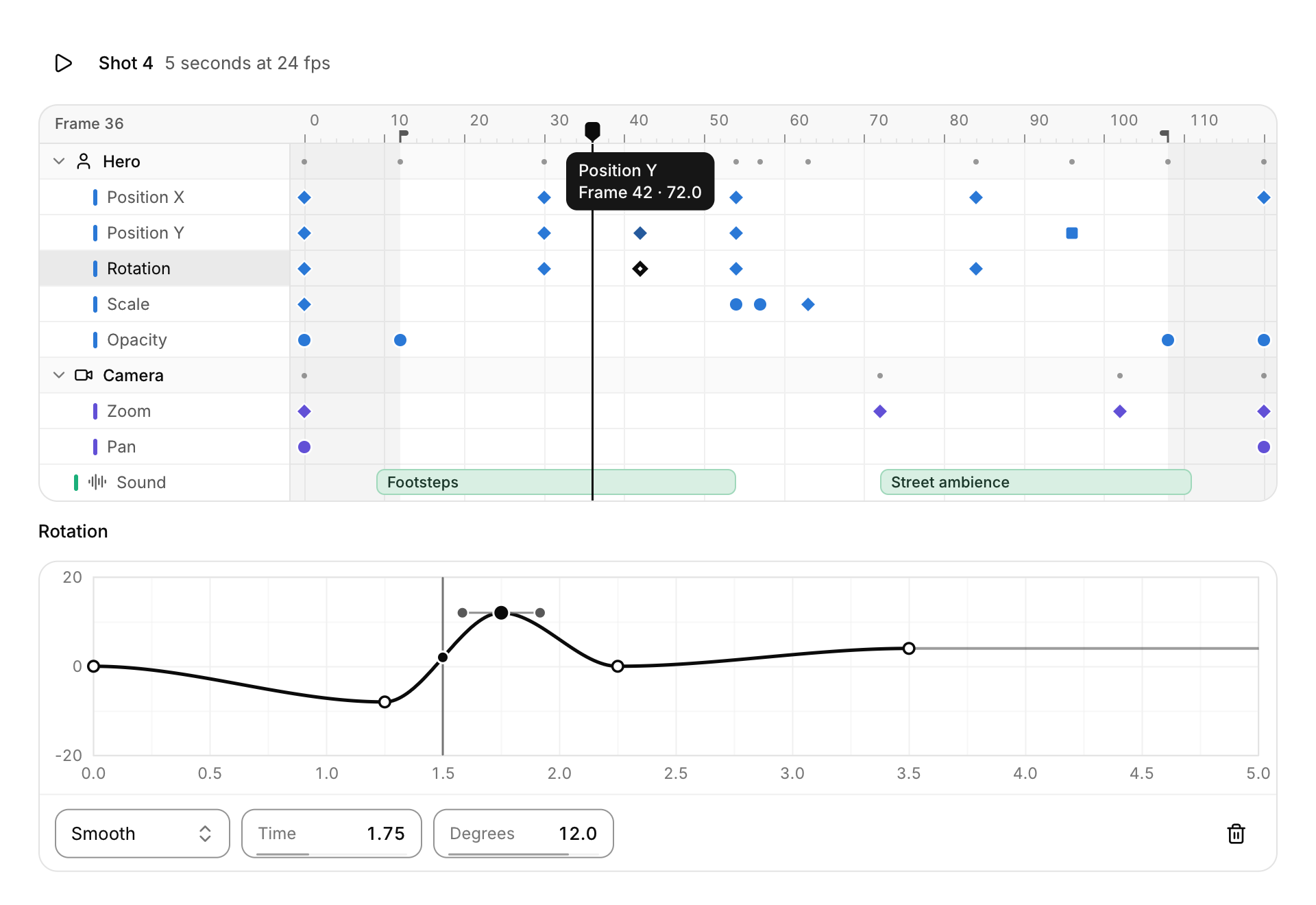
A dope sheet for animation, video and audio tools: a track list on the left, a time ruler along the top and a row per track with its keys as small marks. The mark's shape follows the key's interpolation: a diamond for smooth and free keys, a circle for linear, a square for step. Video and audio tracks can carry clips, drawn as rounded bars with their names. A track whose next tracks are deeper is a group; its chevron collapses it, and its row shows its tracks' keys as small dots so a closed group still says where things happen. Tracks take their colors from the series palette (color 1 to 6, or the group's color, or the next color at the top level); the selection and the playhead use the accent. The ruler counts frames, seconds or timecode (.ruler) and thins its labels as you zoom out or narrow the panel, with frame ticks once frames are wide enough to see. On a narrow editor the track list gets narrower, then shows only icons (or first letters) with the names as tooltips.
You own the data, and the editor edits it in place. Keys are cui_curve_key values (x is the time in seconds, y the value), so a track's array is exactly what cui_curve_editor edits and cui_curve_eval reads at runtime, and the example above shows the current track's curve under the timeline with no copying. The selection is a bool array beside the keys (key_selected, which you keep) and a selected flag in each clip; tracks without a selection array show their keys but cannot edit them, and locked tracks are shown and never edited. Keys stay sorted by time and inside start to end, and clips stay sorted and never overlap. The result reports what happened this frame: whether anything changed, a key added by double click (added_track, added_key), how many keys and clips Delete removed, a clip moved or trimmed, a track whose collapsed, hidden or locked flag changed, the time moving and a play request. current_track and current_key say which key was last clicked or added (pass your own ints to keep them); give the same int to the curve editor as .selected and the two stay in step.
Click the ruler to move the playhead there, or drag in it to scrub; the playhead lands on whole frames. Click a key to select it, Shift+click to add one, Ctrl+click to toggle one, or drag in empty space for a box selection (Shift or Ctrl add to the selection). Drag a selected key and every selected key moves with it, by whole frames; hold Shift during the drag to move freely, or set .free_drag. Keys may pass their neighbours (the arrays are re-sorted, the selection follows) and the block stops at the start and end of the sequence. Double click a row to add a key there, on the frame and on the curve so the motion stays as it was. Drag a clip to move it and its ends to trim it; trimming the start moves offset along so the media stays in place. Click a track name to select all its keys. With .toggles each row gets a hide and a lock button. With .in and .out the play range is shaded outside and its markers drag in the ruler. Hovering a key shows its track, its time and its value; hovering a clip shows its start and length.
The wheel zooms time around the pointer, as in the flame graph and the node editor; Shift+wheel or a sideways scroll pans, the wheel over the track list scrolls the rows, and a middle-button drag pans both ways. Only the rows in view are visited and only the keys in view are searched, one mark per point at most, so thousands of tracks scroll and zoom as smoothly as a few. Pass a cui_timeline_view to keep the view yourself (zeroed, it fits the whole sequence). The view follows the playhead when it leaves the view, so playback pages along.
With the editor focused, Left and Right step the playhead by a frame (Shift: ten frames), Alt+Left and Alt+Right move the selected keys by a frame (Shift: ten), Up and Down jump to the previous and next key on the visible tracks, Home and End go to the start and end, Space reports a play request (play_toggled; you advance the time), Delete or Backspace removes the selected keys and clips, Ctrl+A selects every key on the visible tracks, Esc clears the selection, + and - zoom around the playhead and F fits the whole sequence. Fitting animates and snaps with reduced motion.
Keyboard
- The result reports what happened this frame: whether anything changed, a key added by double click (
added_track,added_key), how many keys and clips Delete removed, a clip moved or trimmed, a track whose collapsed, hidden or locked flag changed, the time moving and a play request. - Click a key to select it, Shift+click to add one, Ctrl+click to toggle one, or drag in empty space for a box selection (Shift or Ctrl add to the selection).
- Drag a selected key and every selected key moves with it, by whole frames; hold Shift during the drag to move freely, or set
.free_drag. - The wheel zooms time around the pointer, as in the flame graph and the node editor; Shift+wheel or a sideways scroll pans, the wheel over the track list scrolls the rows, and a middle-button drag pans both ways.
- With the editor focused, Left and Right step the playhead by a frame (Shift: ten frames), Alt+Left and Alt+Right move the selected keys by a frame (Shift: ten), Up and Down jump to the previous and next key on the visible tracks, Home and End go to the start and end, Space reports a play request (
play_toggled; you advance the time), Delete or Backspace removes the selected keys and clips, Ctrl+A selects every key on the visible tracks, Esc clears the selection, + and - zoom around the playhead and F fits the whole sequence.
Options of cui_timeline_editor
| Option | Type | Default | Description |
|---|---|---|---|
.start | float | the sequence in seconds; both 0 = 0..10 | |
.end | float | the sequence in seconds; both 0 = 0..10 | |
.fps | float | 30: snapping, stepping and frame labels | frames per second, default 30: snapping, stepping and frame labels |
.ruler | int | cui_timeline_ruler | |
.view | cui_timeline_view * | NULL keeps it in the editor | |
.in | float * | a play range: with both set, markers to drag in the ruler and shading outside | |
.out | float * | a play range: with both set, markers to drag in the ruler and shading outside | |
.current_track | int * | the key last clicked or added, or -1; kept by you (NULL: in the editor) | |
.current_key | int * | the key last clicked or added, or -1; kept by you (NULL: in the editor) | |
.width | cui_size | fill | default fill |
.height | float | fits every track (up to 360) | default: fits every track (up to 360) |
.row_height | float | 26 | default 26 |
.track_width | float | 184 | track list, default 184; narrower (then icons only) on a narrow editor |
.toggles | bool | hide and lock buttons on every track | |
.free_drag | bool | drags and scrubbing do not snap to frames |
cui_timeline_track
| Field | Type | Description |
|---|---|---|
name | const char * | shown in the track list and in tooltips |
icon | const char * | optional, before the name |
depth | int | 0 top level; the deeper tracks after a track belong to it (a group) |
collapsed | bool | a group hides its tracks (its chevron toggles this) |
muted | bool | toggled by the row's buttons (.toggles); a locked track can't be edited |
locked | bool | toggled by the row's buttons (.toggles); a locked track can't be edited |
color | uint8_t | series color 1..6; 0 takes the group's, or the next one at the top level |
keys | cui_curve_key * | sorted by x: x is the time in seconds, y the value (may be NULL) |
key_count | int | keys in keys; the editor changes it when keys are added or removed |
key_capacity | int | room in keys; a double click adds no key once it is full (or 0) |
key_selected | bool * | parallel to keys, kept by you; NULL: the keys are shown but not selectable |
clips | cui_timeline_clip * | sorted by start, not overlapping (may be NULL) |
clip_count | int | clips in clips; lowered when selected clips are removed |
cui_curve_key
| Field | Type | Description |
|---|---|---|
x | float | position along the horizontal axis, in curve units (seconds in a timeline track) |
y | float | the curve's value at the key |
in_dx | float | handle toward the previous key, relative to the key (FREE) |
in_dy | float | handle toward the previous key, relative to the key (FREE) |
out_dx | float | handle toward the next key, relative to the key (FREE) |
out_dy | float | handle toward the next key, relative to the key (FREE) |
mode | uint8_t | cui_curve_mode |
cui_timeline_clip
| Field | Type | Description |
|---|---|---|
start | float | seconds, end > start |
end | float | seconds, end > start |
offset | float | where the clip starts in its media; trimming the start moves it along |
name | const char * | drawn in the clip's bar when it fits, and in its tooltip |
selected | bool | the clip is selected: set and cleared by clicks, kept by you |
cui_timeline_editor_result
| Field | Type | Description |
|---|---|---|
changed | bool | keys or clips moved, were added or removed, or a track flag changed |
time_changed | bool | *time moved (scrub, ruler click, keys) |
scrubbing | bool | the playhead is being dragged |
play_toggled | bool | Space: start or stop playback |
selection_changed | bool | a key or clip was selected or unselected this frame |
view_changed | bool | the visible time range or the row scroll changed (zoom, pan, fit) |
keys_moved | bool | selected keys moved this frame (drag or Alt+arrows) |
added_track | int | the key added this frame (double click), or -1 |
added_key | int | the key added this frame (double click), or -1 |
removed_keys | int | how many were removed this frame (Delete) |
removed_clips | int | how many were removed this frame (Delete) |
clip_track | int | the clip moved or trimmed this frame, or -1 |
clip | int | the clip moved or trimmed this frame, or -1 |
toggled | int | the track whose collapsed, muted or locked flag changed, or -1 |
current_track | int | track of the key last clicked or added, or -1 |
current_key | int | index of that key in its track, or -1 |
hovered_track | int | the key under the pointer, or -1 |
hovered_key | int | the key under the pointer, or -1 |
Related
- Flame graph: A profiler timeline: time runs left to right and call depth top to bottom, so each span sits in the row of its depth, under its parent.
- Curve editor: Keyframes on a plot, for easing, animation timing and response curves.
- Node editor: A canvas of nodes joined by curved links, for shader graphs, audio patching or visual scripting.
- Gradient editor: A color ramp with its stops underneath, over a checkerboard so transparent stops read as transparent.