Components / Data display
Gradient editor
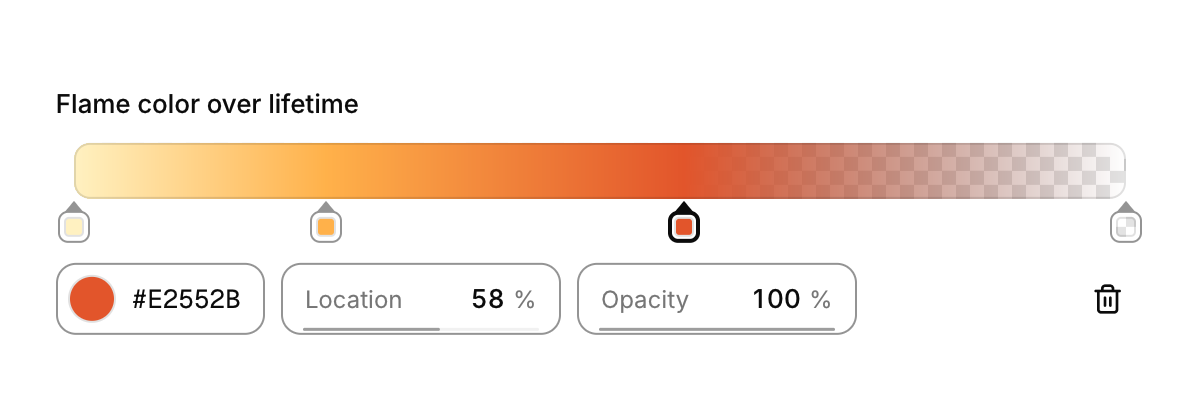
A color ramp with its stops underneath, over a checkerboard so transparent stops read as transparent.
Functions: cui_gradient_editor, cui_gradient_eval
Usage
static cui_gradient_stop flame[12] = {
    { 0.00f, { 0xFF, 0xF1, 0xC1, 0xFF } }, { 0.24f, { 0xFF, 0xB1, 0x4A, 0xFF } },
    { 0.58f, { 0xE2, 0x55, 0x2B, 0xFF } }, { 1.00f, { 0x5C, 0x1F, 0x16, 0x00 } },   /* fades out */
};
static int count = 4, selected = 0;
if (cui_gradient_editor(ui, "flame", flame, &count, 12, .selected = &selected).changed) upload_ramp();

/* at runtime: the color the ramp shows at t */
cui_color c = cui_gradient_eval(flame, count, particle_age / lifetime);
You own the array of cui_gradient_stop and its capacity; the editor edits it in place and keeps it sorted by position, and the result reports added, removed and selected like the curve editor. cui_gradient_eval interpolates each channel, alpha included, between the stops on either side of t, exactly as the ramp is drawn; the end colors continue past the first and last stop.
Drag a stop to move it; it may pass its neighbours, and the selection follows it. Click the ramp or the empty track to add a stop with the color found there (keep the button down to drag it straight away). Drag a stop well off the ramp, or press Delete, to remove it; there are never fewer than two. Double click a stop, or press Enter on a focused one, to open the color picker for it. The row under the ramp shows the selected stop's color (the same color picker, which leaves opacity alone), its location and its opacity as scrub fields, and a button to remove it; on a narrow editor the fields stack. Stops are focusable: Tab moves through them, Left and Right nudge by 1% (Shift for 0.1%).
Keyboard
- Drag a stop well off the ramp, or press Delete, to remove it; there are never fewer than two.
- Double click a stop, or press Enter on a focused one, to open the color picker for it.
- Stops are focusable: Tab moves through them, Left and Right nudge by 1% (Shift for 0.1%).
Options of cui_gradient_editor
| Option | Type | Default | Description |
|---|---|---|---|
.width | cui_size | fill | default fill |
.height | float | 28 | ramp height, default 28 |
.selected | int * | the selected stop, kept by you; NULL keeps it in the editor |
cui_gradient_stop
| Field | Type | Description |
|---|---|---|
pos | float | position along the ramp, 0..1 |
color | cui_color | A theme color such as CUI_COLOR_ACCENT, or CUI_RGB(0x7747ff); unset uses the theme's. |
cui_gradient_result
| Field | Type | Description |
|---|---|---|
changed | bool | a stop moved, changed color, or was added or removed |
added | int | index of the stop added this frame, or -1 |
removed | int | index the removed stop had, or -1 |
selected | int | the selected stop |
Related
- Color picker: A swatch that opens a saturation and brightness square, a hue bar and preset swatches.
- Scrub field: A number you change by dragging sideways on it, as in design and 3D tools.
- Curve editor: Keyframes on a plot, for easing, animation timing and response curves.
- Timeline editor: A dope sheet for animation, video and audio tools: tracks, a time ruler and keys you can move.