Components / Planning
Node editor
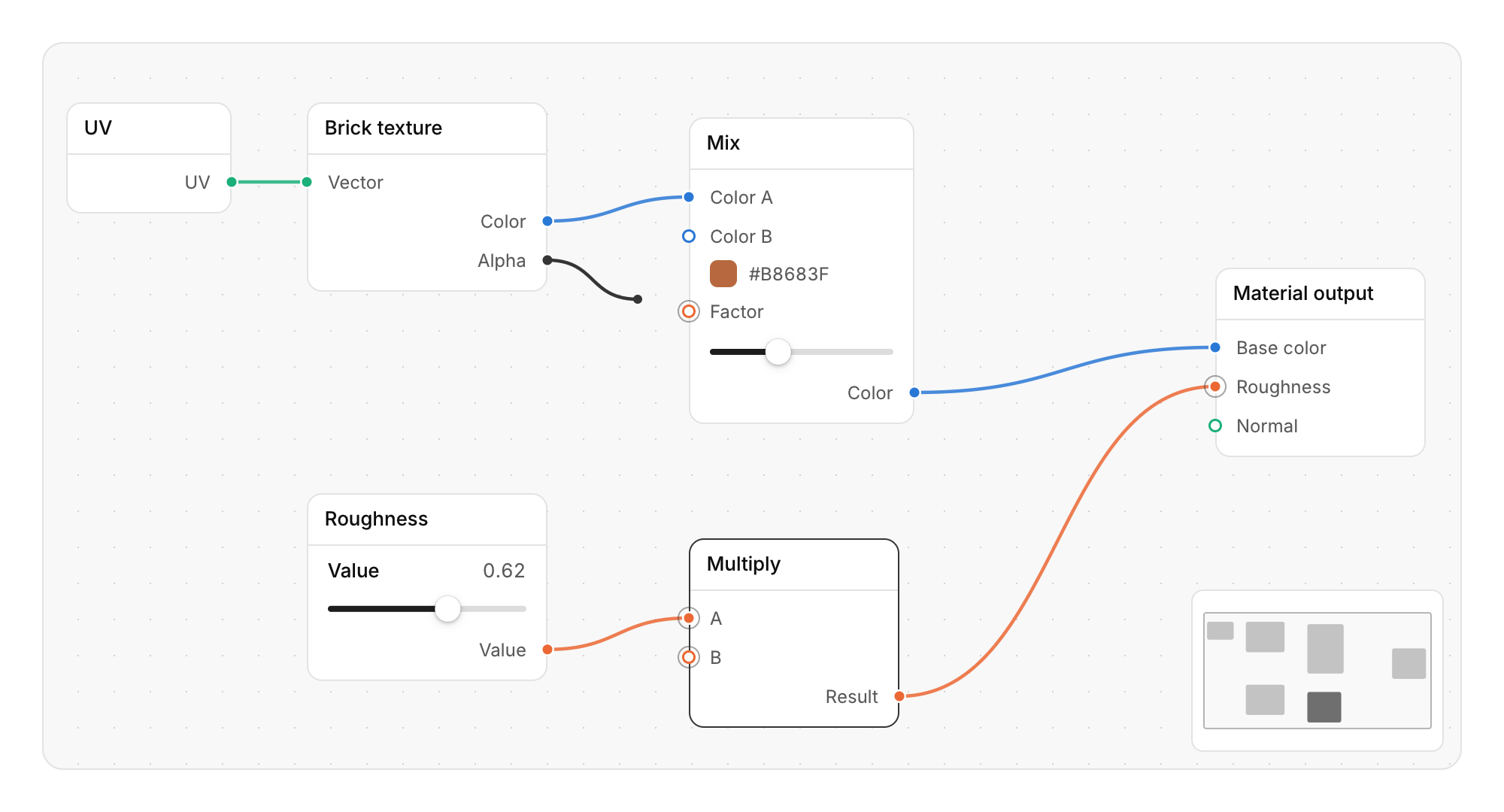
A canvas of nodes joined by curved links, for shader graphs, audio patching or visual scripting.
Functions: cui_node_begin, cui_node_content, cui_node_deleted, cui_node_editor_begin, cui_node_editor_end, cui_node_end, cui_node_input, cui_node_link, cui_node_link_created, cui_node_link_removed, cui_node_output
Usage
static cui_node_view view;                                   /* pan and zoom, kept by you */
if (cui_node_editor_begin(ui, "material", &view, .height = CUI_PX(480), .minimap = true)) {
    for (int i = 0; i < node_count; i++) {
        node *n = &nodes[i];
        cui_node_begin(ui, n->id, &n->x, &n->y, n->title, .width = 160);   /* moves n->x, n->y */
        cui_node_input(ui, n->pin_color, "Color", .type = PIN_COLOR);
        if (!cui_node_input(ui, n->pin_factor, "Factor", .type = PIN_FLOAT))
            cui_node_content(ui) { cui_slider(ui, "##factor", &n->factor, 0, 1); }   /* unlinked: set it here */
        cui_node_output(ui, n->pin_out, "Result", .type = PIN_COLOR);
        cui_node_end(ui);
    }
    for (int k = 0; k < link_count; k++) cui_node_link(ui, links[k].id, links[k].from_pin, links[k].to_pin);
    int from, to, id;
    while (cui_node_link_created(ui, &from, &to)) add_link(from, to);   /* output pin, input pin */
    while (cui_node_link_removed(ui, &id)) remove_link(id);
    while (cui_node_deleted(ui, &id)) remove_node(id);           /* its links were reported above */
    cui_node_editor_end(ui);
}
You own the graph: node, pin and link ids are your integers, the editor moves the positions you pass and reports links made, links removed and nodes deleted, and you change your data. Scroll to zoom around the pointer (25% to 200%); pan with the middle button, or hold Space and drag. Click a node to select it, Shift or Ctrl click to add to the selection, drag on the empty canvas for a marquee, and drag a node to move it with the rest of the selection, which lifts while it moves. Drag from a pin to make a link: the wire follows the pointer, pins it can join show a ring, and it snaps to the nearest one. Pins of one type share a color from the series palette and only join their own type (0 joins anything); an input takes one link, so a new one replaces the old. Drag a link's input end off its pin to detach it, or click a wire and press Delete. With the keyboard, Tab moves through the nodes (focusing a node selects it), the arrow keys move the selection (Shift for single points), Delete or Backspace removes it, Ctrl+A selects every node, F frames them all, + and - zoom, 0 returns to 100% and Esc drops a wire or clears the selection. The editor draws its cards, labels, pins and wires at the zoom, so they stay sharp. Components in cui_node_content are laid out at 100% and scaled with the view: they work at any zoom, but their text is sharpest at 100% and below, and menus they open are placed for 100%. Links cannot be made from the keyboard.
Keyboard
- Scroll to zoom around the pointer (25% to 200%); pan with the middle button, or hold Space and drag.
- Click a node to select it, Shift or Ctrl click to add to the selection, drag on the empty canvas for a marquee, and drag a node to move it with the rest of the selection, which lifts while it moves.
- Drag a link's input end off its pin to detach it, or click a wire and press Delete.
- With the keyboard, Tab moves through the nodes (focusing a node selects it), the arrow keys move the selection (Shift for single points), Delete or Backspace removes it, Ctrl+A selects every node, F frames them all, + and - zoom, 0 returns to 100% and Esc drops a wire or clears the selection.
Options of cui_node_begin
| Option | Type | Default | Description |
|---|---|---|---|
.width | float | Width in points; 0 uses the component's own. | |
.icon | const char * | An icon: a CUI_ICON_* constant, or a string from another icon font. |
Options of cui_node_editor_begin
| Option | Type | Default | Description |
|---|---|---|---|
.width | cui_size | fill the width, 440 tall | default: fill the width, 440 tall |
.height | cui_size | fill the width, 440 tall | default: fill the width, 440 tall |
.min_zoom | float | 0.25 .. 2 | default 0.25 .. 2 |
.max_zoom | float | 0.25 .. 2 | default 0.25 .. 2 |
.no_grid | bool | Hides the grid lines. | |
.minimap | bool | an overview of the graph in the bottom right corner; click it to move there |
Options of cui_node_input, cui_node_output
| Option | Type | Default | Description |
|---|---|---|---|
.type | int | 0 links to any pin; another number links only to pins of that type and picks their color |
cui_node_view
| Field | Type | Description |
|---|---|---|
x | float | where the canvas origin sits, in points from the editor's left edge; panning changes it |
y | float | where the canvas origin sits, in points from the editor's top edge |
zoom | float | scale of the canvas; 0 means 1. Kept between min_zoom and max_zoom |
Related
- Slider: Picks a number, or a range with two thumbs, by dragging along a track.
- Gantt chart: A task list on the left and a timeline that scrolls sideways, with months, day numbers and shaded weekends.
- Month calendar: A month grid with the events of each day, for schedules and planners.
- Week calendar: A week of timed events on a day grid, which can be moved and resized by dragging.