Components / Planning
Month calendar
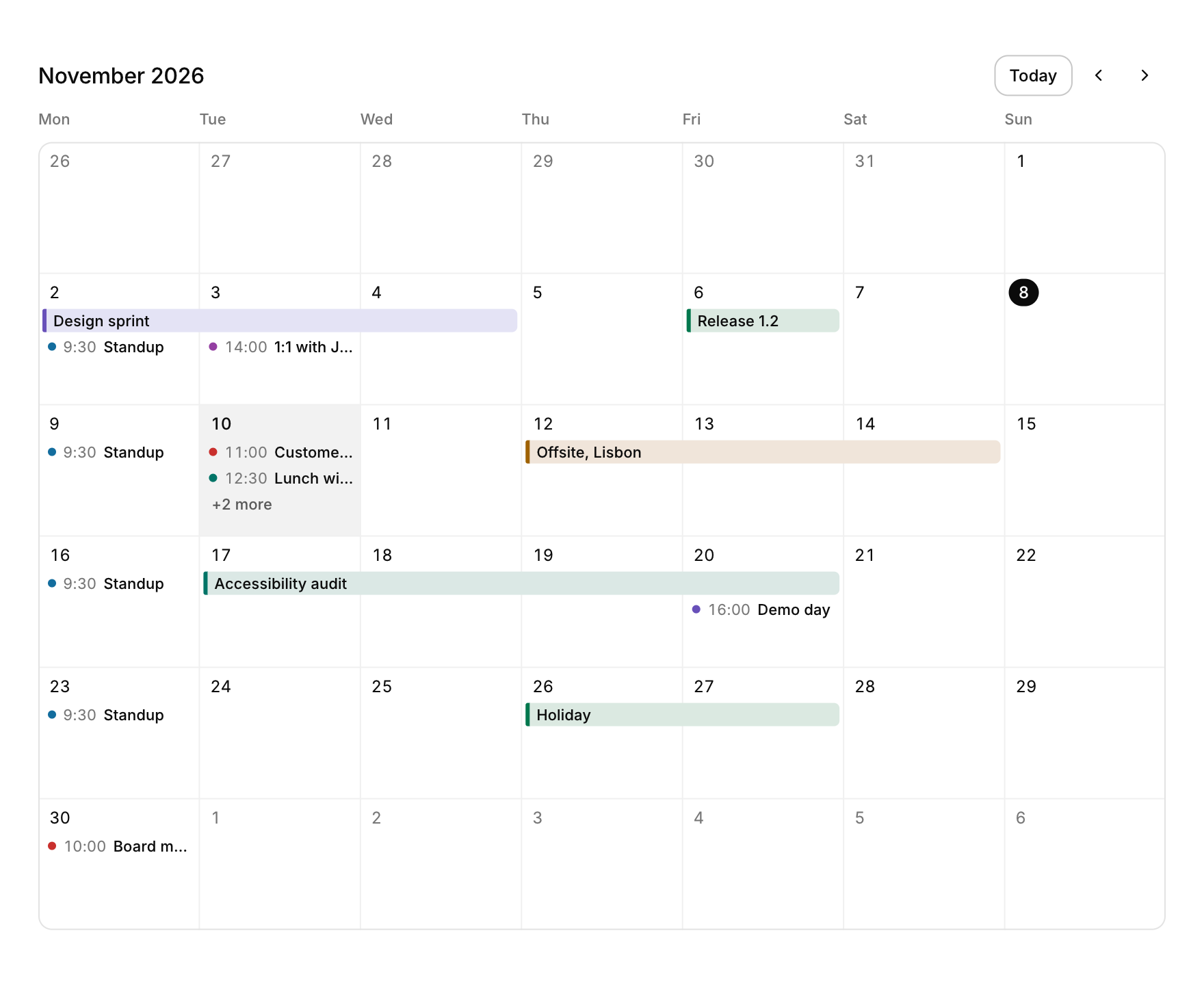
A month grid with the events of each day, for schedules and planners.
Functions: cui_month_calendar
Usage
static const cui_month_event events[] = {
    { "Design sprint", { 2026, 11, 2 }, { 2026, 11, 4 }, 0, true, CUI_TONE_VIOLET },   /* spans three days */
    { "Standup", { 2026, 11, 2 }, { 0 }, 9.5f, false, CUI_TONE_INFO },                 /* 9:30 */
};
static cui_date month = { 2026, 11, 1 }, day;

cui_month_result r = cui_month_calendar(ui, "cal", &month, events, 2, .selected = &day);
if (r.event >= 0) open_event(r.event);
if (r.day_activated) new_event_on(day);
The header names the month, with Today and the previous and next month; the grid shows the weeks the month touches, Monday first (first_weekday picks another day), with today marked and the selected day tinted. All-day and multi-day events are bars that run across the days they cover and continue into the next week, sharing lanes so they never overlap; timed events are a colored dot, the time and the title, in time order under the bars of their day. When a day has more than its cell holds, its last line says "+N more" and opens a list of all its events. Event colors come from the theme's tones.
Clicking an event returns it in r.event, clicking a day selects it (selected is yours to read and set) and double-clicking a day sets r.day_activated, the place to add an event. With the grid focused, the arrows move the selected day and carry on into the next or previous month, Page Up and Page Down change month, Home goes to today, Space selects and Enter activates the day. month_names and day_names take names in another language, hour12 writes 9:30a, cell_height sets the rows (104 by default) and today overrides the system date.
On a narrow screen (under 520 points) the cells show the day number and up to three colored dots, and the selected day's events are listed under the grid with their times. The events of the weeks in view are laid out once a frame by sorting the timed ones, so a month with thousands of events still builds in about a millisecond.
Keyboard
- With the grid focused, the arrows move the selected day and carry on into the next or previous month, Page Up and Page Down change month, Home goes to today, Space selects and Enter activates the day.
Options of cui_month_calendar
| Option | Type | Default | Description |
|---|---|---|---|
.selected | cui_date * | the selected day: yours to read and set | |
.first_weekday | int | Monday | 0 Monday (default) .. 6 Sunday |
.cell_height | float | 104, 44 on a phone | default 104, 44 on a phone |
.month_names | const char *const * | 12 names for another language, January first | |
.day_names | const char *const * | 7 short names, Monday first | |
.hour12 | bool | 9:30a rather than 9:30 | |
.today | cui_date | overrides the system date when set (another time zone, tests) |
cui_month_event
| Field | Type | Description |
|---|---|---|
title | const char * | shown on the event's bar, or after the time of a timed event |
start | cui_date | inclusive; an unset or earlier end means one day |
end | cui_date | inclusive; an unset or earlier end means one day |
time | float | hour of a timed event (9.5 is 9:30); ignored when all_day |
all_day | bool | a bar, like every event that spans days |
tone | cui_tone | One of CUI_TONE_NEUTRAL, CUI_TONE_INFO, CUI_TONE_SUCCESS, CUI_TONE_WARNING, CUI_TONE_DANGER, CUI_TONE_VIOLET, CUI_TONE_TEAL, CUI_TONE_ROSE or CUI_TONE_ACCENT. |
cui_tone: CUI_TONE_NEUTRAL, CUI_TONE_INFO, CUI_TONE_SUCCESS, CUI_TONE_WARNING, CUI_TONE_DANGER, CUI_TONE_VIOLET, CUI_TONE_TEAL, CUI_TONE_ROSE, CUI_TONE_ACCENT
cui_month_result
| Field | Type | Description |
|---|---|---|
event | int | clicked event, or -1 |
day_clicked | bool | a day was clicked or moved to with the keys (see selected) |
day_activated | bool | double-clicked or Enter: add an event there |
month_changed | bool | the arrows, Today or the keys changed *month |
Related
- Gantt chart: A task list on the left and a timeline that scrolls sideways, with months, day numbers and shaded weekends.
- Week calendar: A week of timed events on a day grid, which can be moved and resized by dragging.
- Node editor: A canvas of nodes joined by curved links, for shader graphs, audio patching or visual scripting.
- Kanban board: Columns of cards the user drags between stages.