Components / Data display
Flame graph
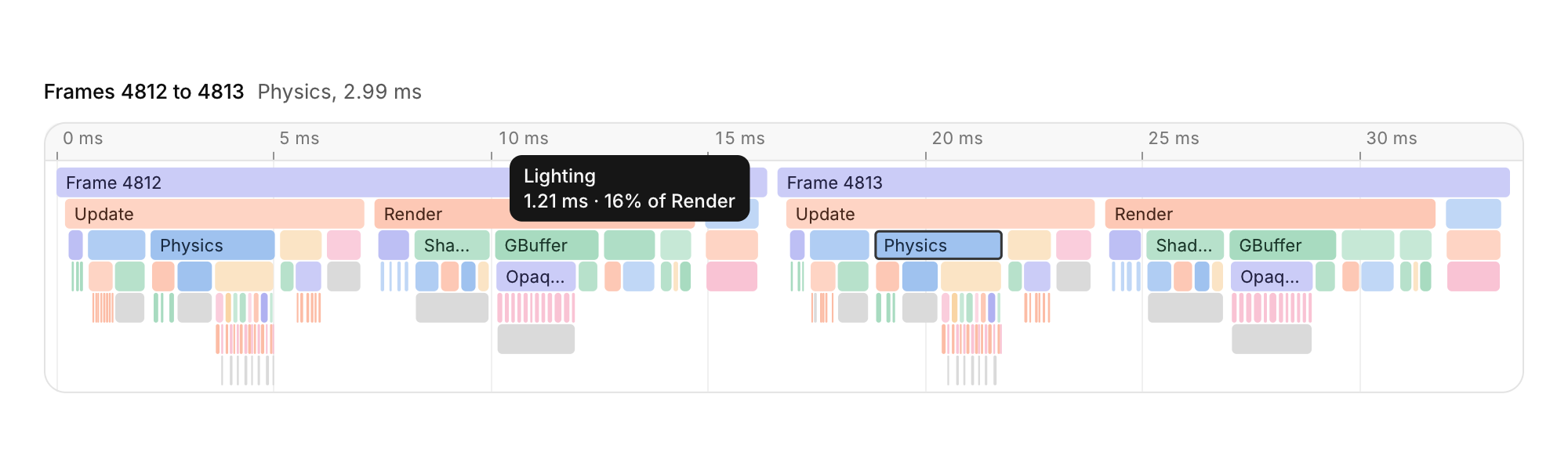
A profiler timeline: time runs left to right and call depth top to bottom, so each span sits in the row of its depth, under its parent.
Functions: cui_flame_graph, cui_flame_sort
Usage
static cui_flame_span spans[MAX_SPANS];   /* from your profiler: name, start, end (seconds), depth */
static int span_count;
static cui_flame_view view;               /* zeroed: fits every span */
static int selected = -1;

cui_flame_sort(spans, span_count);        /* once per capture: by depth, then start */

cui_flame_result r = cui_flame_graph(ui, "capture", spans, span_count, &view, &selected, .height = 240);
if (r.selection_changed && selected >= 0)
    show_details(&spans[selected]);       /* name, duration, children... */
A time ruler along the top picks its unit from the zoom (s, ms, µs or ns) and thins its ticks on a narrow panel; faint lines carry the ticks down through the rows. Spans take their color from the series palette, hashed from the name (or from color_key when you set one) so a function keeps its color across frames; the selected span gets the accent outline. Labels show inside spans that have room and are cut with an ellipsis, staying in the visible part of a span that runs off the edge. Spans thinner than a point are merged with their neighbours into a quiet gray run, so a capture zoomed out never turns into noise.
The wheel zooms around the pointer, Shift+wheel or a sideways scroll pans, and dragging pans sideways and, for stacks deeper than the panel, up and down. Click a span to select it (empty space clears the selection); double-click it to zoom until it fills the view, or double-click empty space to fit everything. Hovering a span shows its name, its duration and its share of its parent (or of the view, for the top row). With the graph focused, Left and Right move to the previous or next span in the row, Up to the parent and Down to the first child, and the view follows the selection; Shift+Left and Right pan, + and - zoom, Enter or Space zooms to the selection, Home or F fits everything, and Esc fits everything or, when everything is already in view, clears the selection. Zooming to a span and fitting animate, and snap with reduced motion.
You own the data: the spans need to be valid only during the call, and the graph writes the view and the selection you pass. Spans must be sorted by depth and then start (cui_flame_sort does it), and spans of one depth must not overlap, which holds for any call tree since a child lies within its parent. With that order every lookup is a binary search: the graph visits only the rows and spans in view and skips through dense regions a pixel at a time, so a capture of 100,000 spans pans and zooms as smoothly as a small one. cui_flame_span_rect returns where a span was drawn, to anchor a popover or a menu on it. An aggregated flame graph (identical stacks merged and sorted by total time) is not included; build the merged tree yourself and pass it as spans if you need one.
Keyboard
- The wheel zooms around the pointer, Shift+wheel or a sideways scroll pans, and dragging pans sideways and, for stacks deeper than the panel, up and down.
- With the graph focused, Left and Right move to the previous or next span in the row, Up to the parent and Down to the first child, and the view follows the selection; Shift+Left and Right pan, + and - zoom, Enter or Space zooms to the selection, Home or F fits everything, and Esc fits everything or, when everything is already in view, clears the selection.
Options of cui_flame_graph
| Option | Type | Default | Description |
|---|---|---|---|
.width | cui_size | fill | default fill |
.height | float | fits the rows (up to 360) | default: fits the rows (up to 360) |
.row_height | float | 20 | default 20 |
.min_range | double | 1e-8 | deepest zoom in seconds, default 1e-8 |
cui_flame_span
| Field | Type | Description |
|---|---|---|
name | const char * | drawn in the span when it fits, and in its tooltip |
start | double | seconds, end >= start |
end | double | seconds, end >= start |
depth | int | row, 0 = top |
color_key | uint32_t | 0: hashed from name |
cui_flame_view
| Field | Type | Description |
|---|---|---|
start | double | visible time range; end <= start fits every span |
end | double | visible time range; end <= start fits every span |
scroll | float | rows scrolled off the top, in points |
cui_flame_result
| Field | Type | Description |
|---|---|---|
selection_changed | bool | *selected changed (click or keys) |
view_changed | bool | *view changed (zoom, pan, fit, animation) |
hovered | int | span under the pointer, or -1 |
zoomed | int | span zoomed to this frame (double-click, Enter), or -1 |
Related
- Curve editor: Keyframes on a plot, for easing, animation timing and response curves.
- Hex viewer: The bytes of a file or of memory in hex and ASCII, for binary tools, emulators and debuggers.
- Gradient editor: A color ramp with its stops underneath, over a checkerboard so transparent stops read as transparent.
- Terminal: Output over an input line, for build logs, a game console or a REPL.