Components / Data display
Hex viewer
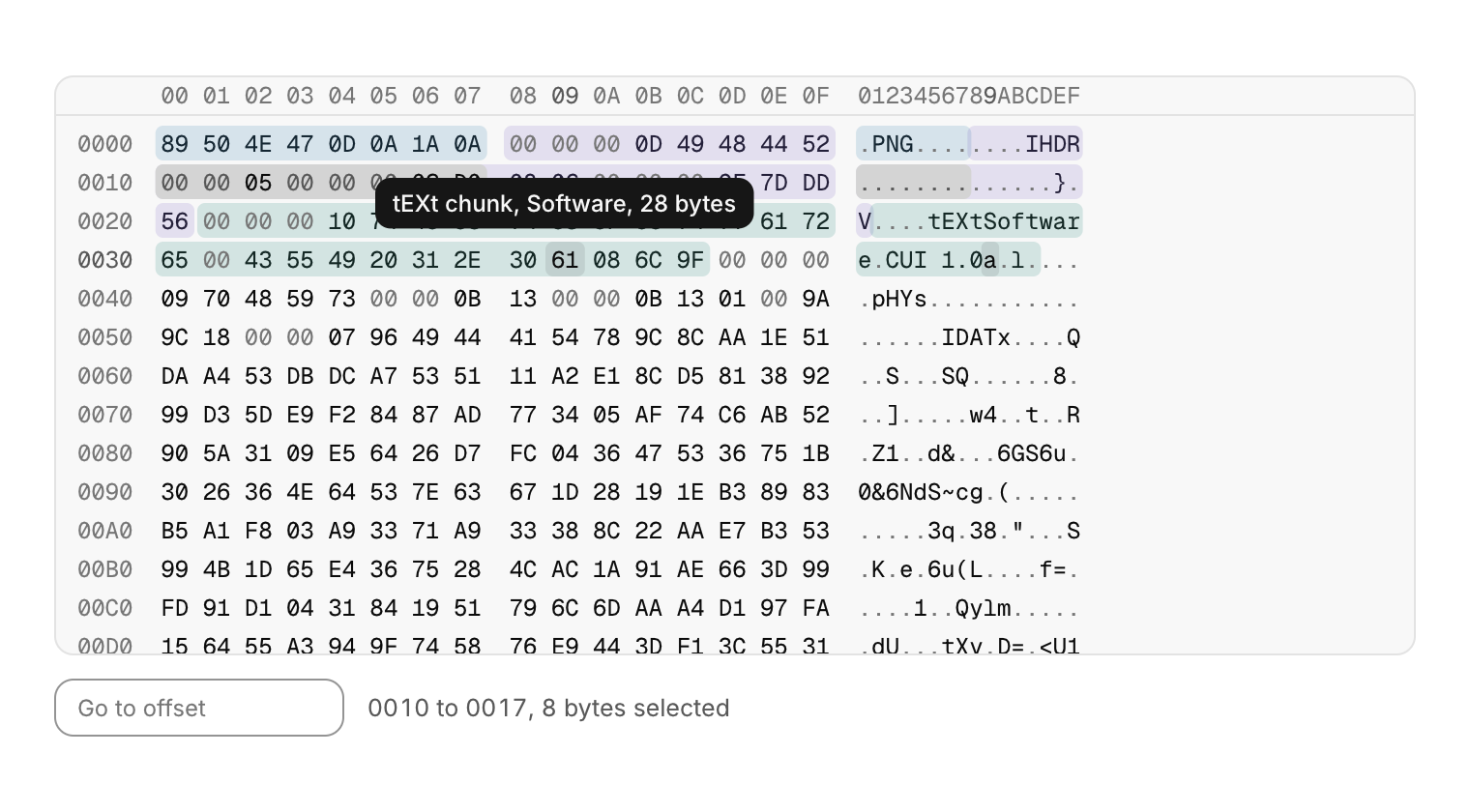
The bytes of a file or of memory in hex and ASCII, for binary tools, emulators and debuggers.
Functions: cui_hex_view, cui_hex_view_goto
Usage
static cui_hex_selection sel;                         /* yours: read it, or set it to select from code */
static const cui_hex_range marks[] = {
    { 0, 8, CUI_TONE_INFO, "PNG signature" },
    { 8, 25, CUI_TONE_VIOLET, "IHDR chunk" },
};
static char go[20];

cui_hex_result r = cui_hex_view(ui, "hex", rom, rom_size, &sel, .base = 0x80000000u,
                                .ranges = marks, .range_count = 2, .edit = rom);   /* .edit: optional */
if (r.selection_changed) show_value(rom + sel.start, sel.length);
if (r.edited) mark_dirty(r.edit_offset, r.edit_length);
if (cui_input(ui, "goto", go, sizeof go, .placeholder = "Go to offset") & CUI_SUBMITTED)
    cui_hex_view_goto(ui, "hex", (size_t)strtoull(go, NULL, 16));
Bytes of a file or of memory, for binary tools, emulators and debuggers: an offset column, the bytes in hex and the same bytes as ASCII (printable characters, a dot for the rest), all in the code font under a header of column offsets. You own the bytes; they are read during the call and never kept. .base is the address shown for the first byte, and the offset column is as wide as the last address needs. Rows hold 16 bytes with a small gap after every 8 (.bytes_per_row 8 or 32). Only the rows in view are built and the scroll position is kept in rows, so a file of many megabytes scrolls like a short one. The view never scrolls sideways: when it is narrower than its rows it drops to fewer bytes per row (down to 8), then hides the ASCII column, then tightens its margins, then shows 4 bytes per row. Zero bytes and the dots for other characters step back in a quieter color.
Hovering a byte marks it in both columns and lights its column in the header. Highlighted ranges (.ranges, an array of offset, length, tone and label) are drawn as quiet tints in the theme's tones, later ones on top, and hovering a byte in a range shows its label and size as a tooltip. Click a byte to select it, drag or Shift+click for a range; the selection is drawn in both columns and written to your cui_hex_selection (start, length and the cursor byte), or kept by the view when you pass NULL. The result also reports whether it changed, the byte under the pointer and whether anything was copied. With the view focused, the arrows move the cursor byte, Shift+arrows extend the selection, Page Up and Page Down move by a screen, Home and End go to the start and end of the row, Ctrl+Home and Ctrl+End to the start and end of the data, Ctrl+A selects everything and Esc clears the selection. Ctrl+C copies the selection as hex text (89 50 4E 47) and Ctrl+Shift+C copies it as ASCII, both up to 4 MiB of bytes. cui_hex_view_goto moves the cursor to an offset, selects that byte and scrolls it into view (to the middle when it was out of sight) on the view's next frame; call it from the same id scope as the view.
The view is read only unless you pass .edit, a writable buffer of the same size (usually the same memory as the data), which it shows instead. Typing hex digits then overwrites the byte at the cursor, high digit first (a block over the low digit shows the byte is half typed), and moves to the next byte; the result reports the bytes written that frame. Edits never change the size, and the ASCII column is not typed into.
Keyboard
- Click a byte to select it, drag or Shift+click for a range; the selection is drawn in both columns and written to your
cui_hex_selection(start, length and the cursor byte), or kept by the view when you pass NULL. - With the view focused, the arrows move the cursor byte, Shift+arrows extend the selection, Page Up and Page Down move by a screen, Home and End go to the start and end of the row, Ctrl+Home and Ctrl+End to the start and end of the data, Ctrl+A selects everything and Esc clears the selection.
- Ctrl+C copies the selection as hex text (
89 50 4E 47) and Ctrl+Shift+C copies it as ASCII, both up to 4 MiB of bytes.
Options of cui_hex_view
| Option | Type | Default | Description |
|---|---|---|---|
.width | cui_size | fill | default fill |
.height | float | the rows, up to 320 | default: the rows, up to 320; negative fills the space |
.base | uint64_t | address shown for byte 0 in the offset column | |
.bytes_per_row | int | 16 | 8, 16 (default) or 32 |
.ranges | const cui_hex_range * | byte ranges to highlight, each with a tone and a tooltip label | |
.range_count | int | entries in ranges, drawn in order with later ones on top | |
.edit | uint8_t * | writable bytes to show and overwrite instead of data (usually the same memory), or NULL for read only | |
.no_ascii | bool | hide the ASCII column | |
.no_header | bool | hide the column header (00 01 .. 0F) | |
.size | float | 12 | font size, default 12 |
cui_hex_selection
| Field | Type | Description |
|---|---|---|
start | size_t | offset of the first selected byte |
length | size_t | bytes selected; 0 means nothing is selected |
cursor | size_t | the byte the keys move from; one end of the selection |
cui_hex_result
| Field | Type | Description |
|---|---|---|
selection | cui_hex_selection | after this frame (the same as *sel when you pass one) |
selection_changed | bool | by the pointer, the keys or cui_hex_view_goto |
edited | bool | bytes in .edit were overwritten this frame |
edit_offset | size_t | with edited: offset of the first byte overwritten this frame |
edit_length | size_t | with edited: bytes from edit_offset up to the last one overwritten |
hovered | int64_t | byte under the pointer, or -1 |
copied | bool | Ctrl+C or Ctrl+Shift+C put the selection on the clipboard |
Related
- Flame graph: A profiler timeline: time runs left to right and call depth top to bottom, so each span sits in the row of its depth, under its parent.
- Terminal: Output over an input line, for build logs, a game console or a REPL.
- Curve editor: Keyframes on a plot, for easing, animation timing and response curves.
- Log console: A log view for many thousands of lines, with level filters, search, follow and copy.