Components / Navigation
Table of contents
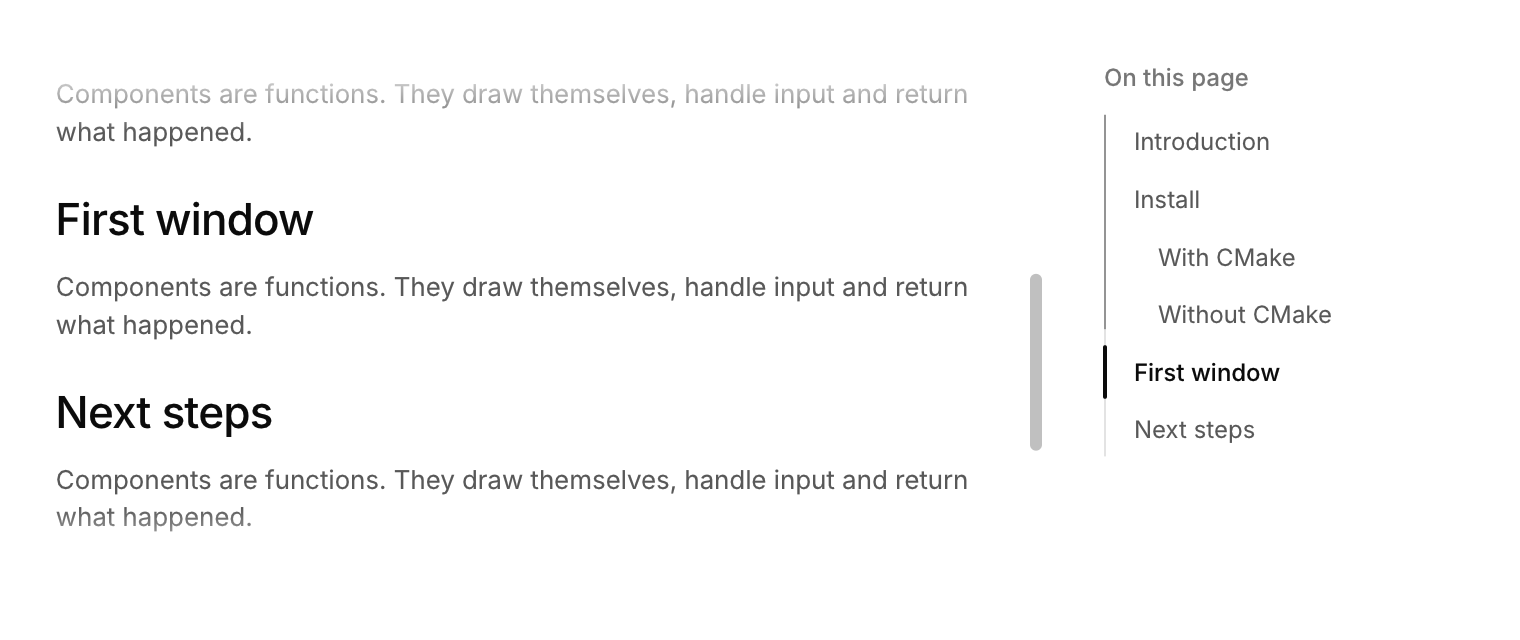
A list of a page's sections that follows the reader and scrolls to a section when clicked.
Functions: cui_scroll, cui_toc, cui_toc_anchor
Usage
static const cui_toc_item toc[] = { { "Install", "install", 0 }, { "With CMake", "cmake", 1 } };
cui_row(ui) {
    cui_scroll(ui, .id = "doc", .width = CUI_FILL) {
        cui_toc_anchor(ui, "install");  cui_heading(ui, "Install", 3);   /* ... */
        cui_toc_anchor(ui, "cmake");    cui_heading(ui, "With CMake", 4);
    }
    cui_toc(ui, "doc", toc, 2);   /* same scope as the scroll area */
}
The rail fills as you read, and a marker glides to the section in view. Clicking an entry scrolls there smoothly. level indents entries.
cui_toc returns the index of the section in view, or of the entry that was just clicked. The section in view is the last one whose anchor has passed a line 30% of the way down the scroll area. You own the cui_toc_item array: a title, the anchor's name and a level from 0 to 4. cui_toc_anchor puts an invisible marker at that point of the scroll area; call it just before each heading, with the same string as in the item. Anchor names are matched across the whole window whatever the id scope, so keep them unique.
Keyboard
- Tab moves through the entries, and Enter or Space jumps to the focused section.
cui_toc_item
| Field | Type | Description |
|---|---|---|
title | const char * | the entry's text in the list |
anchor | const char * | the name given to cui_toc_anchor at that section's heading |
level | int | indentation: 0 for a top level section, up to 4 (12 points each) |
Related
- Menu bar: The File, Edit, View row of a desktop app, with a menu under each title.
- Breadcrumb, pagination and stepper: Three ways to show position: the path to a page, the page of a list, and the step of a process.
- Toolbar: A row of small buttons, toggles and separators for an editor's most used commands.
- Sidebar navigation: The items and section titles of an app's sidebar, with one highlight that follows the selection.