Components / Pickers
Knob, fader and level meter
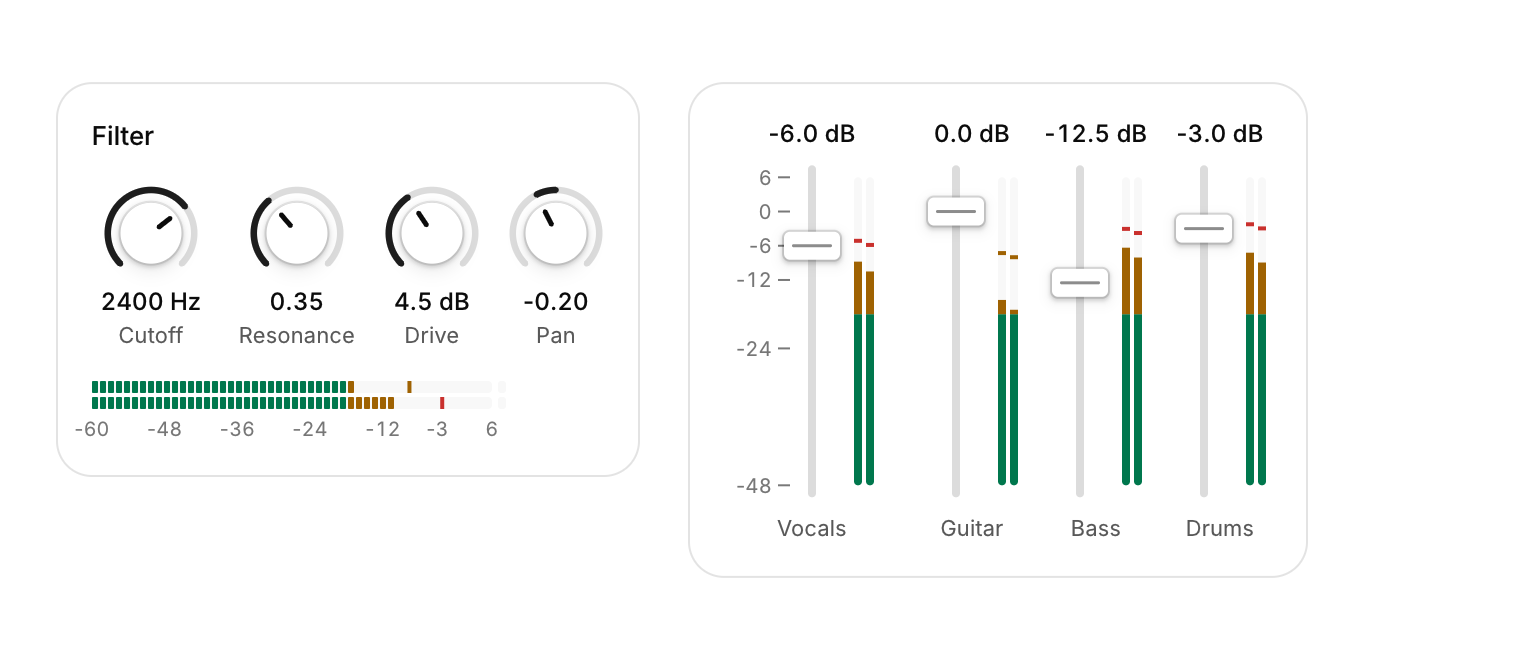
A rotary knob, a vertical fader and a level meter: the controls of audio, synth and mixer panels.
Functions: cui_fader, cui_knob, cui_level_meter
Usage
static float cutoff = 2400, pan, gain_db;
static const float marks[] = { 6, 0, -6, -12, -24, -48 };

cui_knob(ui, "Cutoff", &cutoff, 20, 20000, .unit = "Hz", .log_scale = true, .reset = 1000);
cui_knob(ui, "Pan", &pan, -1, 1, .bipolar = true, .format = "%+.2f");
cui_fader(ui, "Vocals", &gain_db, -48, 6, .unit = "dB", .ticks = marks, .tick_count = 6,
          .meter = peaks, .meter_channels = 2);           /* peaks: linear, 1.0 = 0 dBFS */
cui_level_meter(ui, "master", peaks, 2, .horizontal = true, .segmented = true, .scale = true);
A knob turns by dragging up and down: 200 points cover the whole range, and holding Shift makes it ten times finer from wherever the pointer is. A ring shows the value against a 270 degree track; bipolar grows it from the middle for pan or EQ gain, and log_scale makes equal turns multiply the value, which is what frequency and time knobs need. The value and the label sit under the knob in a column as wide as the longest value, so a row of knobs never shifts while one turns.
A fader is a track with a thumb: press the thumb to drag it from where it is, or press the track and the thumb jumps there first. ticks puts a labelled scale beside the track, and meter draws level bars right next to it on the fader's own dB scale, so a channel strip is a single call. Faders are vertical unless horizontal is set.
Both take step, format and unit, and both answer the same keys and gestures once focused: the arrows step (1% of the range without a step), Shift+arrows and Page Up and Page Down step ten times as far, Home and End go to the ends, and double-click, Delete or Backspace go back to reset, which is 0 kept within the range (0 dB, the middle of -1 to 1, or the minimum of 20 to 20000). The wheel turns a control only after it has been clicked or tabbed to, so scrolling a page past a mixer never moves a level.
The level meter takes linear sample peaks, where 1.0 is 0 dBFS. Bars jump up to each new peak and fall back at decay dB per second (20 by default), the peak mark holds for hold seconds (1.5) and then falls, and a clip light at the loud end stays on after a peak reaches 0 dBFS until it is clicked. The colors run green to -18 dB, amber to -6 dB and red above. scale labels the dB marks that fit, segmented draws LED segments, and min_db, max_db, length, thickness and horizontal set the shape. Up to eight channels share one meter. Each control is a single painted node, so a mixer with dozens of strips costs little more than one.
Keyboard
- A knob turns by dragging up and down: 200 points cover the whole range, and holding Shift makes it ten times finer from wherever the pointer is.
- Both take
step,formatandunit, and both answer the same keys and gestures once focused: the arrows step (1% of the range without a step), Shift+arrows and Page Up and Page Down step ten times as far, Home and End go to the ends, and double-click, Delete or Backspace go back toreset, which is 0 kept within the range (0 dB, the middle of -1 to 1, or the minimum of 20 to 20000). - Up to eight channels share one meter.
Options of cui_fader
| Option | Type | Default | Description |
|---|---|---|---|
.label | const char * | under a vertical fader, before a horizontal one; the id when NULL | |
.format | const char * | "%.1f" | default "%.1f" |
.unit | const char * | A unit shown after the value. | |
.length | float | 160 | track length, default 160 |
.horizontal | bool | the track runs left to right, with the label before it, instead of bottom to top | |
.step | float | The amount one step changes the value by. | |
.reset | float | 0 (clamped to the range) | double-click value, default 0 (clamped to the range) |
.ticks | const float * | values to mark and label beside the track, e.g. dB marks; at most 32 | |
.tick_count | int | entries in ticks | |
.meter | const float * | linear sample peaks, one per channel, for a level meter beside the track; NULL for none | |
.meter_channels | int | entries in meter, up to 8; a dB fader's range sets the meter's scale | |
.hide_value | bool | Hides the value's text. | |
.disabled | bool | Greyed out, and takes no input. |
Options of cui_knob
| Option | Type | Default | Description |
|---|---|---|---|
.label | const char * | under the knob; the id when NULL | |
.format | const char * | "%.0f" | printf format for the value, default "%.0f" |
.unit | const char * | after the value, e.g. "Hz" or "dB" | |
.size | float | 48 | diameter, default 48 |
.step | float | 0 = continuous (keys move 1% of the range) | |
.reset | float | 0 (clamped to the range) | double-click value, default 0 (clamped to the range) |
.bipolar | bool | the arc grows from the middle: pan, EQ gain | |
.log_scale | bool | equal turns multiply the value: frequency, time (min > 0) | |
.hide_value | bool | Hides the value's text. | |
.disabled | bool | Greyed out, and takes no input. | |
.color | cui_color | the control color | the value arc, default the control color |
Options of cui_level_meter
| Option | Type | Default | Description |
|---|---|---|---|
.min_db | float | -60 and +6 | default -60 and +6 |
.max_db | float | -60 and +6 | default -60 and +6 |
.length | float | 160 | default 160 |
.thickness | float | 6 | each channel's bar, default 6 |
.horizontal | bool | bars run left to right instead of bottom to top | |
.scale | bool | dB labels beside the bars | |
.segmented | bool | LED segments instead of a solid bar | |
.hold | float | 1.5, < 0 none | peak hold, seconds; default 1.5, < 0 none |
.decay | float | 20 | fall rate, dB per second; default 20 |
Related
- Emoji picker: A searchable grid of every emoji in nine groups, with the recently used ones first.
- Ruler and histogram sliders: Two sliders that show context: a ruler that slides under a fixed marker, and a range slider drawn over the distribution of the data.
- Wheel picker and time dial: Touch-style pickers: drums of options you spin, and a clock face for setting a time.
- Time picker: Picks a time of day from scrolling columns of hours and minutes.