Components / Pickers
Emoji picker
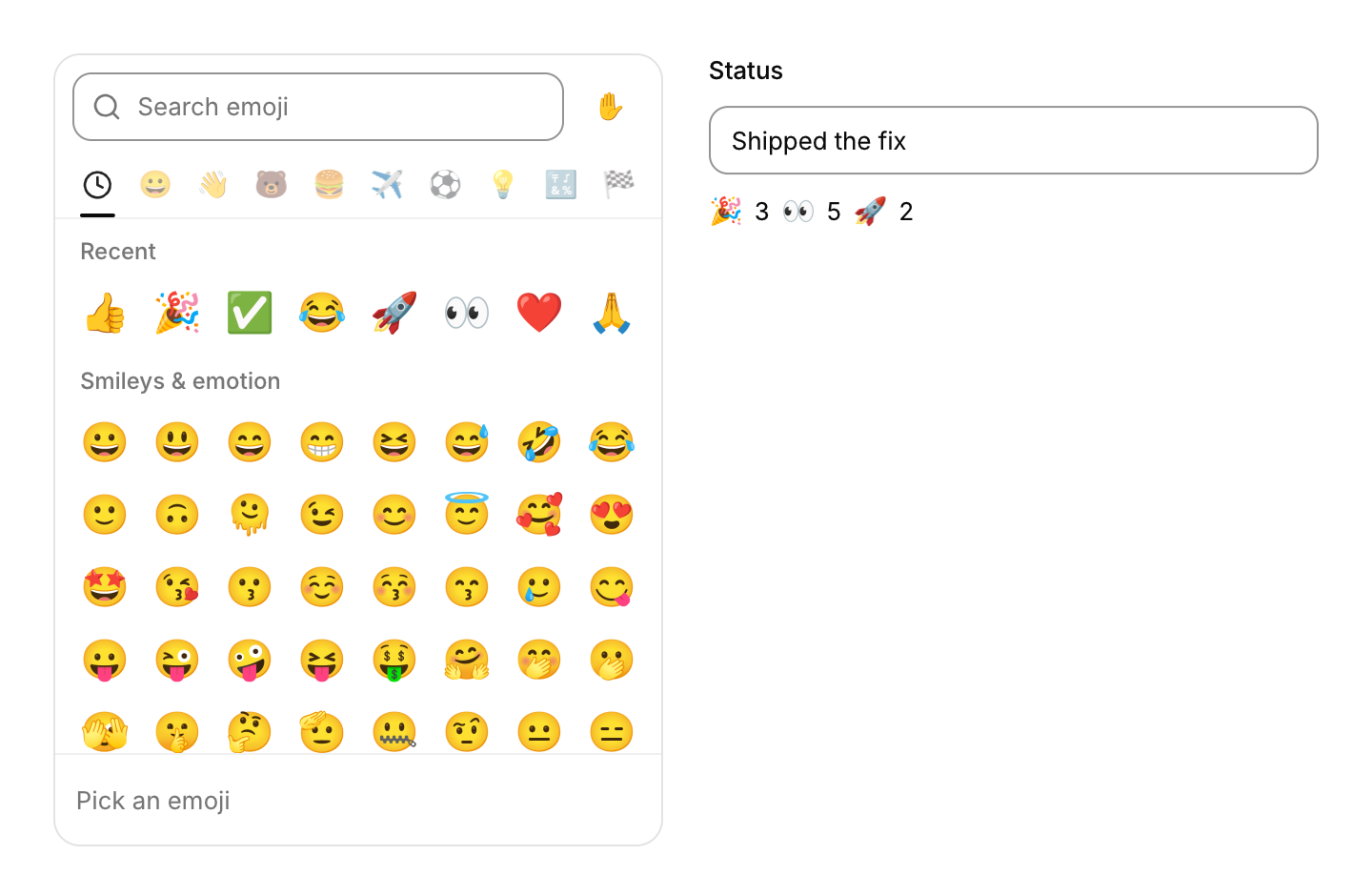
A searchable grid of every emoji in nine groups, with the recently used ones first.
Functions: cui_emoji, cui_emoji_picker
Usage
static char recent[256];   /* save and restore it to keep recent emoji between runs */
static int tone;           /* 0 for none, 1 (light) to 5 (dark) */

if (cui_icon_button(ui, CUI_ICON_SMILE, .tooltip = "Emoji")) cui_popover_toggle(ui, "emoji");
cui_popover(ui, "emoji", .placement = CUI_PLACE_BOTTOM_END, .width = 340, .pad = 0) {
    const char *e = cui_emoji_picker(ui, "picker", .recent = recent, .recent_cap = sizeof recent, .tone = &tone);
    if (e) { insert_text(e); cui_popover_close(ui, "emoji"); }
}

cui_emoji(ui, "\xf0\x9f\x8e\x89", 18);             /* one emoji anywhere, e.g. a reaction */
The 1,914 emoji of Unicode 17 in Unicode's order and nine groups, with their names. The list is built in, compressed to about 16 KB, and unpacked the first time a picker is shown. Search matches the start of words in the name ("red he" finds the red heart), and names that start with the query come first. The tabs jump to a group and show which one is in view, while the name of the group in view stays at the top of the grid. The preview below shows the name of the emoji under the pointer.
The hand next to the search opens the six skin tones. A tone goes after each person in an emoji, so families and people holding hands take it as well. Picked emoji go to the front of the recent list, which the app owns as a space separated string, so it can save it. With the search focused, Down moves into the grid and Enter picks the first result. In the grid the arrows move by cell and by row across groups, Home and End go to the ends, and Enter or Space picks. A tap picks and a drag scrolls, so it works with touch.
Emoji are drawn from a color emoji font. CUI reads the one the system has: Segoe UI Emoji on Windows, Apple Color Emoji on macOS, Noto Color Emoji on Linux and Android. The picker loads it the first time it is shown, or the app can call cui_emoji_font_load_system, or load its own font with cui_emoji_font_load_file / _memory. Bitmap color fonts (sbix and CBDT, with PNG images) and layered ones (COLR version 0) work, and a plain outline font gives emoji in the text color. Skin tones, joined sequences, flags and keycaps are found through the font's own ligatures. A big font is read from its file as needed: only its lookup tables stay in memory, not the images. The picker lists only what the font can draw. Drawn emoji are kept in one 1024 × 1024 texture and reused: a frame draws at most 24 new ones, and the grid draws only the rows in view. In the browser build, emoji come from the browser through cui_platform_iface.draw_emoji, which any platform can provide. With no emoji font at all the picker says so.
.group_names takes ten translated names (recent, then the nine groups), .placeholder, .empty_text and .hint the other text. Search matches the English names. .no_search, .no_tone and .no_preview leave those parts out. .size sets the emoji size (26 by default) and .height the grid height (280).
Keyboard
- With the search focused, Down moves into the grid and Enter picks the first result.
- In the grid the arrows move by cell and by row across groups, Home and End go to the ends, and Enter or Space picks.
Options of cui_emoji_picker
| Option | Type | Default | Description |
|---|---|---|---|
.width | cui_size | up to 360 | default up to 360 |
.height | float | 280 | the grid; default 280 |
.size | float | 26 | emoji size; default 26 |
.recent | char * | buffer for the recent emoji, read and updated here so the app can save it; NULL keeps them in the picker | |
.recent_cap | size_t | size of the recent buffer in bytes; it holds the recent emoji newest first, space separated | |
.tone | int * | skin tone, 0 (none) to 5 (dark), kept by the app | |
.placeholder | const char * | "Search emoji" | |
.empty_text | const char * | "No emoji found" | |
.hint | const char * | the preview with nothing to show: "Pick an emoji" | |
.group_names | const char *const * | 10 names: recent, then Unicode's nine groups | |
.no_search | bool | hides the search field | |
.no_preview | bool | hides the row at the bottom that shows the hovered emoji and its name | |
.no_tone | bool | hides the skin tone button |
Related
- Icon button: A round button with only an icon, ghost by default.
- Popover: A small floating panel anchored to a control, for content that does not need a dialog.
- Knob, fader and level meter: A rotary knob, a vertical fader and a level meter: the controls of audio, synth and mixer panels.
- Ruler and histogram sliders: Two sliders that show context: a ruler that slides under a fixed marker, and a range slider drawn over the distribution of the data.