Components / Pickers
Time picker
Picks a time of day from scrolling columns of hours and minutes.
Functions: cui_time_picker
Usage
static int hour = 9, minute = 30;
cui_time_picker(ui, "start", &hour, &minute);
cui_time_picker(ui, "end", &hour2, &minute2, .twelve_hour = true, .minute_step = 15);
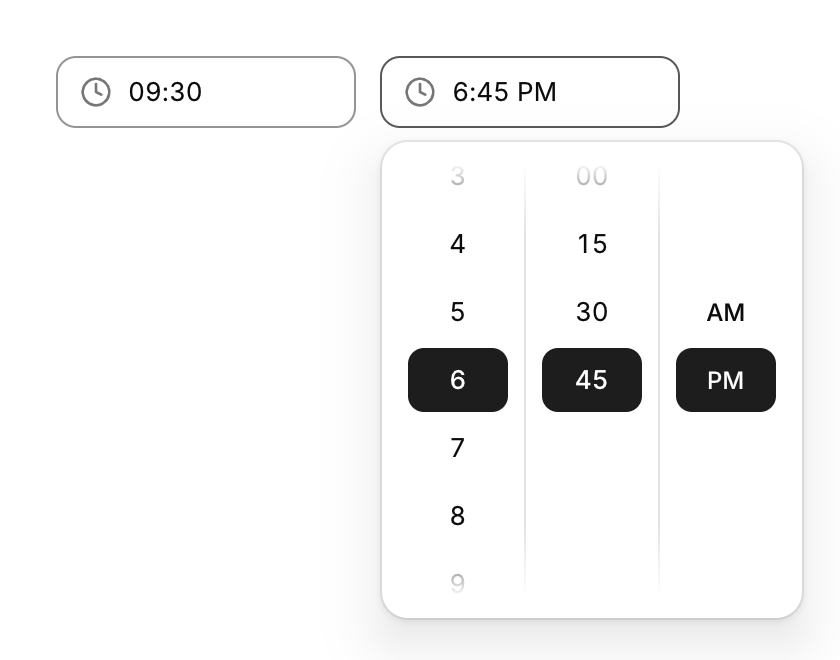
Hour and minute columns (and AM / PM) that open scrolled to the current value. hour is always 0 to 23.
Returns true on the frame a new hour, minute or half of the day is clicked. hour and minute are your two int variables: the picker reads them every frame and writes them while its list is open. twelve_hour changes only what is shown ("9:30 AM"), never what is stored. minute_step is the gap between the minutes offered and defaults to 5; a minute off the step still shows in the field, with no row marked. The list stays open after a click, so hour and minute can be set in one visit.
Keyboard
- Enter or Space on the field opens the list of times and Esc closes it. The times themselves are picked with the pointer; they take no keyboard focus yet.
Options of cui_time_picker
| Option | Type | Default | Description |
|---|---|---|---|
.label | const char * | A label shown above or beside the control. | |
.twelve_hour | bool | shows 1 to 12 with AM and PM (as in "2:30 PM"); *hour stays 0..23 | |
.minute_step | int | 5 | minutes between the entries of the minute column, default 5 |
.width | cui_size | Width: CUI_FILL, CUI_FIT, CUI_PX(n) or CUI_PCT(n); unset uses the component's own. |
Related
- Wheel picker and time dial: Touch-style pickers: drums of options you spin, and a clock face for setting a time.
- Date range picker: Picks a start and an end date, with presets such as the last 7 days.
- Ruler and histogram sliders: Two sliders that show context: a ruler that slides under a fixed marker, and a range slider drawn over the distribution of the data.
- Multi-select: Picks several items from a list and shows them as chips in the field.