Components / Developer tools
HTTP request bar
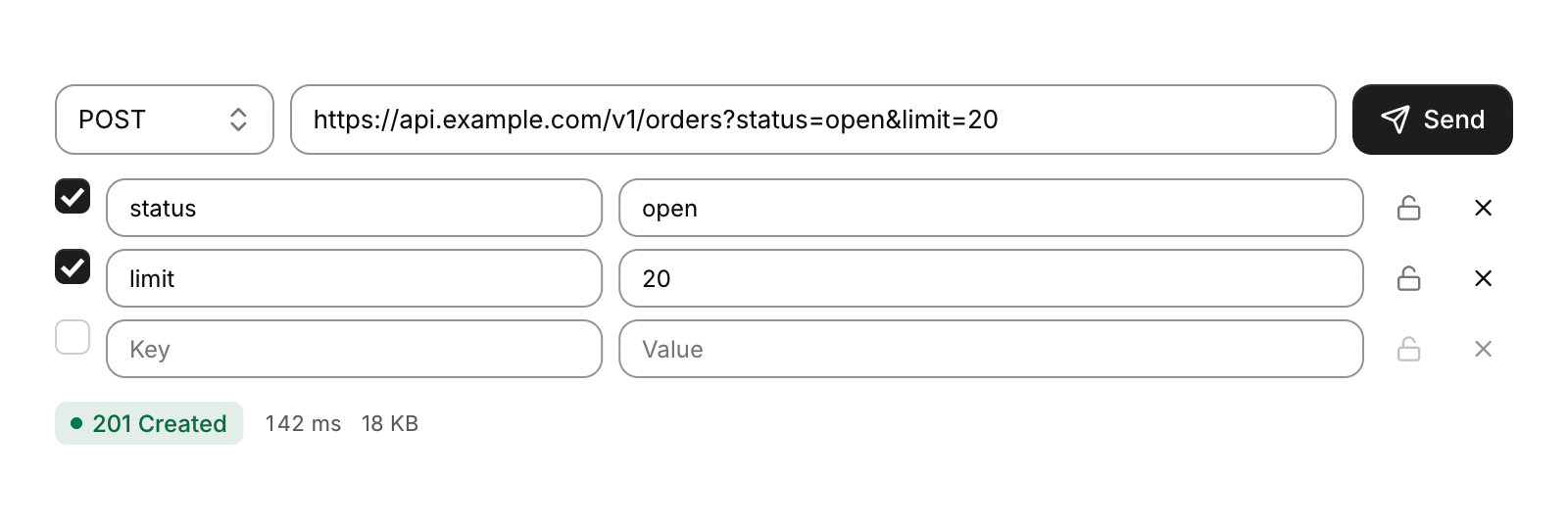
The method, the URL and Send, as in an API client.
Functions: cui_request_bar, cui_response_status, cui_url_params, cui_url_set_params
Usage
static int method = CUI_HTTP_GET;
static char url[512] = "https://api.example.com/v1/orders?status=open";
static cui_kv_pair params[16];
static int nparams = -1;
if (nparams < 0) nparams = cui_url_params(url, params, 16);

cui_request_bar_result r = cui_request_bar(ui, "request", &method, url, sizeof url, .loading = in_flight);
if (r.changed) nparams = cui_url_params(url, params, 16);                  /* the URL changed: reread its query */
if (cui_kv_editor(ui, "params", params, &nparams, 16)) cui_url_set_params(url, sizeof url, params, nparams);
if (r.send) start_request(method, url);
if (r.cancel) cancel_request();
cui_response_status(ui, status, seconds, bytes);
Enter in the URL sends, and while loading the button cancels. On a phone the button keeps only its icon. cui_response_status shows a status badge (green 2xx, blue 3xx, amber 4xx, red 5xx, with the reason phrase), the time and the size. cui_url_params decodes a URL's query into key-value pairs. cui_url_set_params writes the enabled pairs back, percent-encoded, keeping the fragment, and leaves the URL alone when the result would not fit. Together they keep a parameters table in step with the URL. cui_http_reason and cui_http_method_name give the names.
Keyboard
- Enter in the URL sends, and while
loadingthe button cancels.
Options of cui_request_bar
| Option | Type | Default | Description |
|---|---|---|---|
.width | cui_size | Width: CUI_FILL, CUI_FIT, CUI_PX(n) or CUI_PCT(n); unset uses the component's own. | |
.loading | bool | a request is in flight: the button reads Cancel and Enter does not send | |
.placeholder | const char * | Muted text shown while the field is empty. |
cui_kv_pair
| Field | Type | Description |
|---|---|---|
key | char[64] | the name, e.g. "Accept"; edited in place |
value | char[256] | the value, e.g. "application/json"; edited in place |
enabled | bool | the pair is in use; its checkbox toggles this |
secret | bool | the value shows as dots, with an eye to reveal it; the lock button toggles this |
cui_request_bar_result
| Field | Type | Description |
|---|---|---|
send | bool | Send was pressed, or Enter in the URL: start the request |
cancel | bool | Cancel was pressed while loading |
changed | bool | the method or the URL was edited this frame |
Related
- Key-value editor: Rows of key and value fields for HTTP headers, query parameters or environment variables.
- Uptime bars: A status page: each service's current state and a bar for each day of its history.
- Stack trace: An exception with its call stack.
- Time histogram: Event counts over time, stacked by series, as above a log search, with a legend that shows each series' total.