Components / Developer tools
Key-value editor
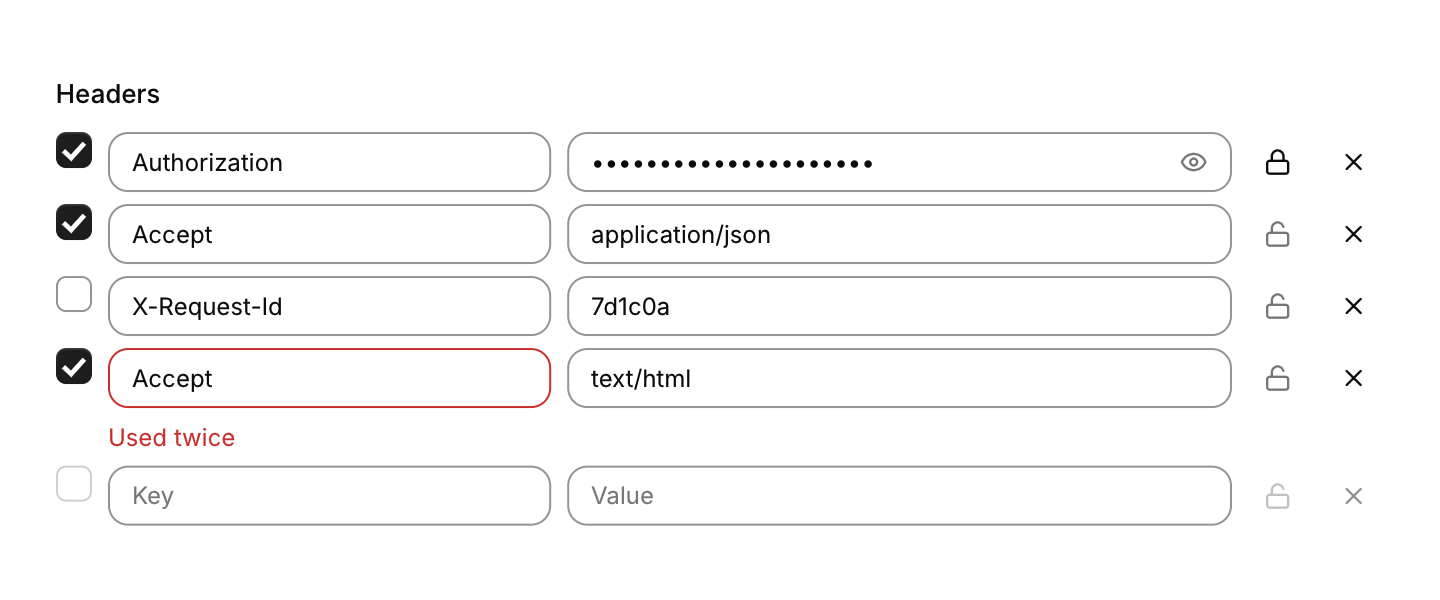
Rows of key and value fields for HTTP headers, query parameters or environment variables.
Functions: cui_kv_editor
Usage
static cui_kv_pair headers[16] = { { "Accept", "application/json", true } };
static int count = 1;

if (cui_kv_editor(ui, "headers", headers, &count, 16))
    rebuild_request();
You own the array, and it is edited in place. The checkbox turns a pair on or off, typing in the empty row at the end adds a pair, and the x removes one. The lock marks a value as secret: it shows as dots, and the field's eye reveals it. A key used twice by enabled pairs, or one with a space in it, is marked under its field. Below 480 points each key sits above its value.
Keyboard
- Tab moves through each row's checkbox, key, value, lock and remove button. The fields edit like any text field, and Enter or Space presses the focused checkbox or button.
Options of cui_kv_editor
| Option | Type | Default | Description |
|---|---|---|---|
.key_placeholder | const char * | "Key" | default "Key" |
.value_placeholder | const char * | "Value" | default "Value" |
.no_toggles | bool | no checkboxes: every pair is on | |
.no_secrets | bool | no eye button | |
.read_only | bool | Shows the value but does not let it be edited. | |
.width | cui_size | fill | default fill |
cui_kv_pair
| Field | Type | Description |
|---|---|---|
key | char[64] | the name, e.g. "Accept"; edited in place |
value | char[256] | the value, e.g. "application/json"; edited in place |
enabled | bool | the pair is in use; its checkbox toggles this |
secret | bool | the value shows as dots, with an eye to reveal it; the lock button toggles this |
Related
- Problems panel: Compiler and linter output grouped by file, with each file's count.
- Pipeline: A CI or CD run: each stage is a column of its jobs with their status and duration, and connectors run between the stages.
- Query builder: A filter built from conditions joined by all or any, in groups that nest.
- Schedule picker: A cron schedule edited through plain choices instead of the expression, with the next runs listed.