Components / Navigation
Docking
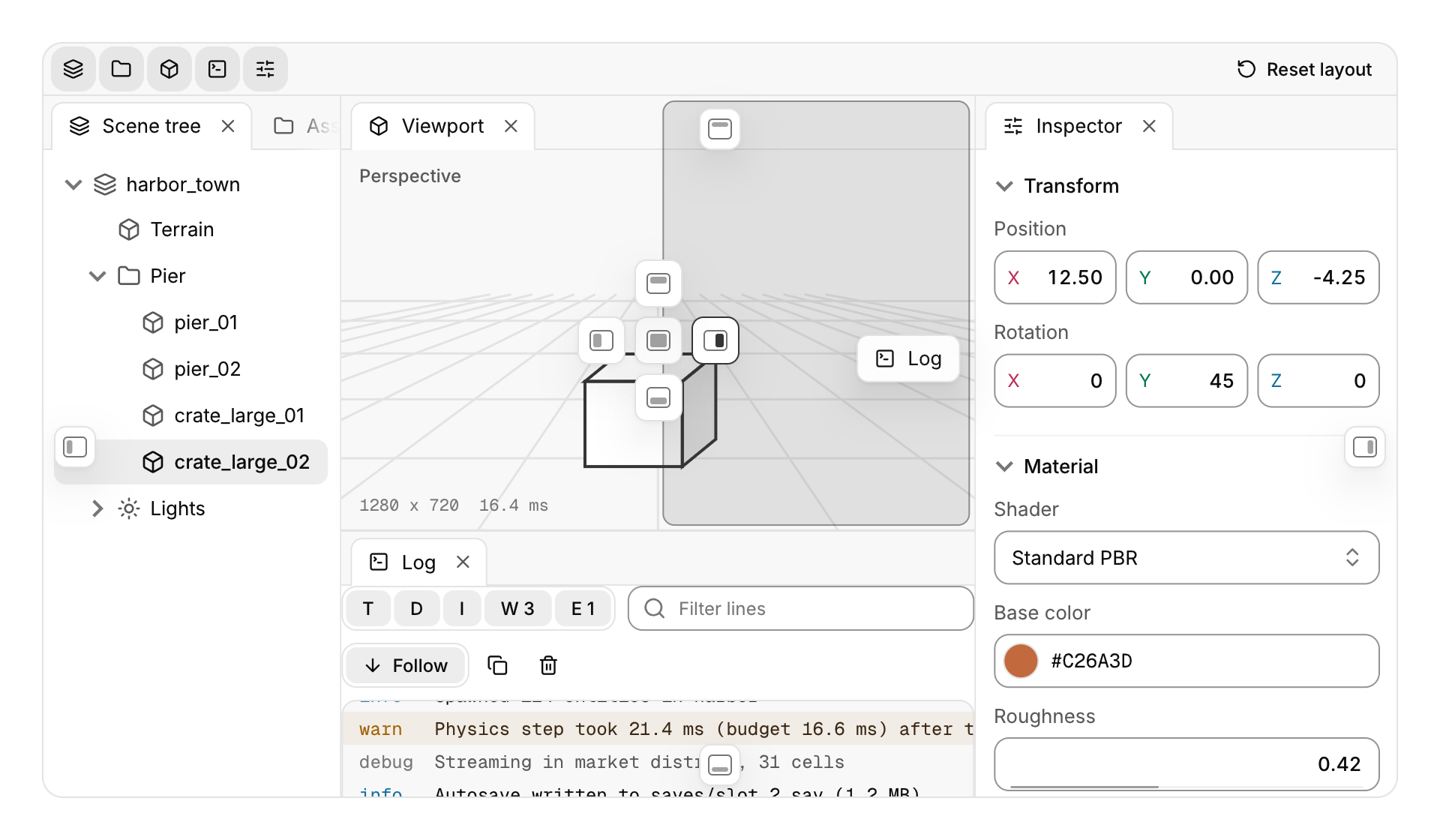
Panels the user arranges by dragging: split, tabbed and resized, with a layout you can save and load.
Functions: cui_dock_load, cui_dock_panel, cui_dock_panel_begin, cui_dock_panel_end, cui_dock_save, cui_dockspace
Usage
static bool show_tree = true, show_log = true, show_props = true;
static char saved[1024];

cui_dockspace(ui, "main", .layout = "dock1 h0.24([*Scene tree],v0.65([*Viewport],[*Log]))", .shortcuts = true) {
    if (cui_dock_panel_begin(ui, "Scene tree", &show_tree, .icon = CUI_ICON_LAYERS)) {
        scene_tree(ui);
        cui_dock_panel_end(ui);
    }
    cui_dock_panel(ui, "Viewport", NULL, .icon = CUI_ICON_BOX) { viewport(ui); }      /* NULL: cannot be closed */
    cui_dock_panel(ui, "Log", &show_log, .icon = CUI_ICON_SQUARE_TERMINAL) { cui_log_view(ui, "log", &log, .height = -1); }
    cui_dock_panel(ui, "Inspector", &show_props) { inspector(ui); }   /* not in the layout: joins the largest leaf */
}

/* View menu: a closed panel comes back where it was */
if (cui_menu_item(ui, "Log", .checked = show_log)) show_log = !show_log;

/* on quit, and on the next start before the first frame */
cui_dock_save(ui, "main", saved, sizeof saved);
if (!cui_dock_load(ui, "main", saved)) { /* malformed: the default layout stays */ }
A dockspace fills its box with your panels, laid out in a tree of splits whose leaves hold one or more panels as document tabs. Submit every panel every frame between cui_dockspace_begin and cui_dockspace_end (or the cui_dockspace scope) in any order; the dockspace decides where each goes, and cui_dock_panel_begin returns true only for the panel whose tab is showing, so hidden tabs cost nothing. The splits are the split view: drag a divider to resize, and it stops where a panel would get smaller than .min_panel_width (120) or .min_panel_height (96). When the dockspace is too narrow for every panel's minimum, the splits share what there is, so panels shrink together and never overlap; on a phone, give the dockspace a stacked layout instead. The tab strips are the document tabs, so they look and behave the same: click to select, drag sideways to reorder, scroll when crowded, and the x closes.
Drag a tab out of its strip to move it. A ghost of the tab follows the pointer and drop targets appear over the leaf under it: the middle one stacks the panel there as a tab and the four around it split the leaf, putting the panel on that side. Four more targets sit at the middle of the dockspace's outer edges and split the whole layout. Between the targets the pointer's position decides (near a side splits, the middle stacks), and over a tab strip the panel goes in at the slot under the pointer, marked with a line. A tinted preview in the accent shows where the panel will land; it glides between targets, and with reduced motion it simply appears. Release to drop it, or press Esc (or release outside the dockspace) to cancel. Dropping a panel onto its own leaf, when it is the only tab there, changes nothing. A leaf that loses its last panel collapses and its split merges back into the neighbour.
The x on a tab (or a middle click, or Delete on the focused tab) sets the panel's *open to false and the panel stops being built. Set it back to true, from a View menu or a toolbar toggle, and the panel returns to its last place, selected, even if its leaf has been out of the layout since; a panel the layout has no place for joins the largest leaf as a tab. Pass NULL instead of a flag for a panel that cannot be closed. Panels are identified by their title, so titles must be unique within a dockspace; "Log (3)###log" keeps the identity while the label changes. A dockspace holds up to 48 panels.
cui_dock_save writes the layout as one line of text, cui_dock_load restores it, and .layout gives the layout for the first run (until something is loaded). The format is
dock1 h0.22([*Scene tree,Assets],h0.6(v0.62([*Viewport],[*Log,-Console]),[*Inspector]))after the dock1 version word comes one node: h (side by side) or v (stacked) is a split, followed by the first child's share from 0 to 1 and the two children in parentheses; [...] is a leaf, its panel names in tab order, * marking the selected tab and - a closed panel. A backslash escapes , [ ] ( ), a backslash, and a leading * or - in a name. Loading also sets each panel's *open from the text the next time the panel is submitted. Names the app has not submitted (yet) are kept in their place, so a layout saved with a plugin's panel survives a run without the plugin. Malformed text (bad syntax, a share outside 0 to 1, more than six decimals, a duplicate name, more than 48 panels or nesting deeper than 40) is refused: cui_dock_load returns false and the layout stays as it was. cui_dock_save returns the full length, like snprintf, and writes what fits. The dockspace's id is global: it does not depend on cui_push_id, so saving and loading work from anywhere.
The layout uses the previous frame's size, so a panel that appears or reopens shows from the next frame (the dockspace asks for one). After cui_dock_panel_begin, cui_last_rect is the panel's tab, for a tooltip or a tour.
Keyboard
- Release to drop it, or press Esc (or release outside the dockspace) to cancel.
- The x on a tab (or a middle click, or Delete on the focused tab) sets the panel's
*opento false and the panel stops being built. - The selected tab of each strip is in the Tab order; Left and Right select along the strip, Home and End jump, Shift+Left and Shift+Right move the tab, and Delete closes it. With
.shortcuts = true, Ctrl+Tab and Ctrl+Shift+Tab (or Ctrl+PageDown and PageUp) cycle the panels of the focused leaf, the one holding the keyboard focus or the last click, and Ctrl+W (Cmd+W on macOS) closes its selected panel. Esc cancels a drag.
Options of cui_dock_panel, cui_dock_panel_begin
| Option | Type | Default | Description |
|---|---|---|---|
.icon | const char * | An icon: a CUI_ICON_* constant, or a string from another icon font. | |
.dirty | bool | unsaved changes: the panel's tab shows a dot in place of its x |
Options of cui_dockspace
| Option | Type | Default | Description |
|---|---|---|---|
.layout | const char * | first run layout, in the cui_dock_save format | |
.width | cui_size | fill | default fill |
.height | cui_size | fill | default fill |
.min_panel_width | float | 120 | default 120; splits stop here (and share what there is when too narrow) |
.min_panel_height | float | 96 | default 96 |
.shortcuts | bool | Ctrl+Tab, Ctrl+Shift+Tab and Ctrl+W act on the focused leaf |
Related
- Document tabs: Closable tabs for open documents that can be dragged into a new order, as in an editor.
- Log console: A log view for many thousands of lines, with level filters, search, follow and copy.
- Dropdown and context menu: A menu of commands that opens from a button, or at the pointer on a right click.
- Menu bar: The File, Edit, View row of a desktop app, with a menu under each title.