Components / Navigation
Document tabs
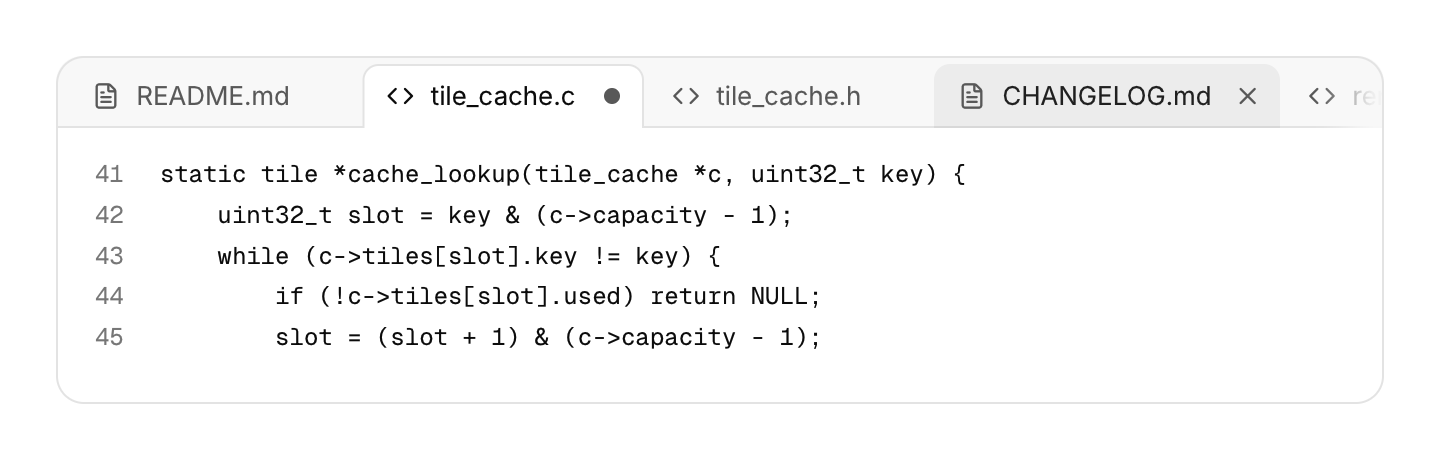
Closable tabs for open documents that can be dragged into a new order, as in an editor.
Functions: cui_doc_tabs
Usage
static cui_doc_tab tabs[16] = { { "README.md", CUI_ICON_FILE_TEXT }, { "tile_cache.c", CUI_ICON_CODE, "src/tile_cache.c", true } };
static int count = 2, active = 0;
cui_doc_tabs_result r = cui_doc_tabs(ui, "docs", tabs, count, &active, .shortcuts = true);
if (r.move_from >= 0) move_tab(tabs, r.move_from, r.move_to);   /* active already follows */
if (r.close >= 0 && confirm_close(r.close)) {
    remove_tab(tabs, &count, r.close);
    if (active > r.close || active == count) active--;
}
A click selects a tab, the x or a middle click asks to close it, and dragging a tab sideways reorders the strip while the others make room. A tab with unsaved changes (dirty) shows a dot, which turns into the x under the pointer. The selected tab is filled with the surface color and opens into the content below. Too many tabs scroll sideways with a fade at the edge, and a newly selected tab scrolls into view. The component reports closes and moves and leaves your array alone, so you can ask before closing; tabs keep their state by title, so give two tabs with the same name a key ("main.c##src"). The selected tab is in the Tab order: Left and Right select, Home and End jump, Shift+Left and Shift+Right move it, Delete closes it. With .shortcuts = true Ctrl+Tab and Ctrl+Shift+Tab (or Ctrl+PageDown and Ctrl+PageUp) switch tabs and Ctrl+W (Cmd+W on macOS) closes the selected one from anywhere in the window. .no_close and .no_reorder turn those parts off.
Keyboard
- The selected tab is in the Tab order: Left and Right select, Home and End jump, Shift+Left and Shift+Right move it, Delete closes it.
- With
.shortcuts = trueCtrl+Tab and Ctrl+Shift+Tab (or Ctrl+PageDown and Ctrl+PageUp) switch tabs and Ctrl+W (Cmd+W on macOS) closes the selected one from anywhere in the window.
Options of cui_doc_tabs
| Option | Type | Default | Description |
|---|---|---|---|
.shortcuts | bool | Ctrl+Tab, Ctrl+Shift+Tab, Ctrl+PageUp/Down and Ctrl+W (Cmd+W on macOS) work from anywhere in the window | |
.no_close | bool | tabs have no x and cannot be closed (middle click, Delete and Ctrl+W do nothing) | |
.no_reorder | bool | tabs cannot be dragged or moved with Shift+Left/Right |
cui_doc_tab
| Field | Type | Description |
|---|---|---|
title | const char * | the tab's text and its identity; add "##key" to tell two tabs with one name apart |
icon | const char * | An icon: a CUI_ICON_* constant, or a string from another icon font. |
tooltip | const char * | Text shown when the pointer rests on it. |
dirty | bool | unsaved changes: a dot in place of the x, which returns under the pointer |
cui_doc_tabs_result
| Field | Type | Description |
|---|---|---|
changed | bool | *selected changed (click, keys or a move) |
close | int | tab to close, or -1 |
move_from | int | move the tab at move_from to move_to, or -1 |
move_to | int | move the tab at move_from to move_to, or -1 |
Related
- Status bar: The thin bar at the bottom of a window for state, counts and background progress.
- Toolbar: A row of small buttons, toggles and separators for an editor's most used commands.
- Docking: Panels the user arranges by dragging: split, tabbed and resized, with a layout you can save and load.
- Menu bar: The File, Edit, View row of a desktop app, with a menu under each title.