Components / Developer tools
Network waterfall
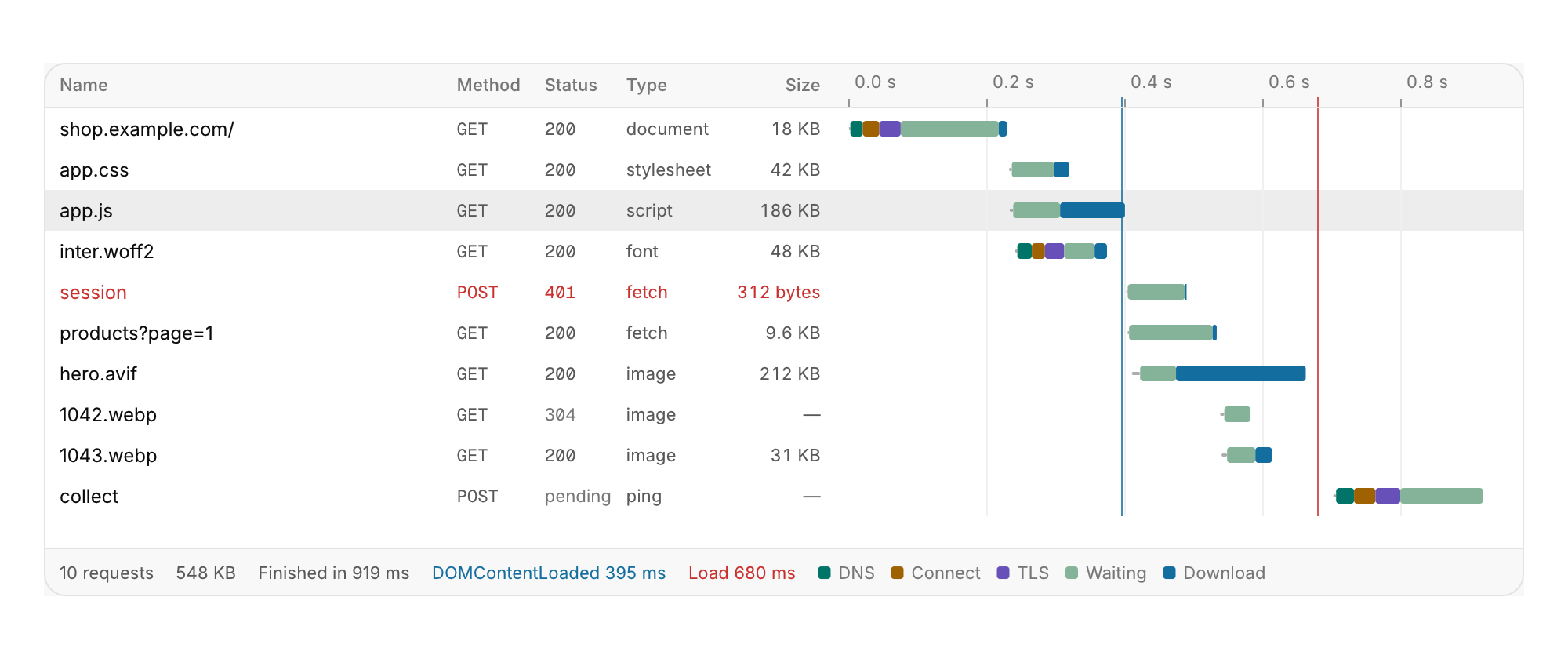
HTTP requests as a table with a timing bar each.
Functions: cui_waterfall
Usage
cui_waterfall_result r = cui_waterfall(ui, "network", requests, request_count,
                                       .selected = &selected, .dom_loaded = 0.395, .loaded = 0.68);
The bar shows its phases in order: a thin line while queued, then DNS, connect, TLS, waiting for the first byte, and download, all on one time scale. Lines mark DOMContentLoaded and load. The name column shows the last part of the path, and failed responses are shown in red. A hover on a bar breaks its time down, and a summary with a legend sits under the table. Up, Down, Home and End move the selection, Enter reports activated, and Esc clears. Below 600 points the method, type and size columns are left out. Thirty thousand requests take under two milliseconds a frame.
Keyboard
- Up, Down, Home and End move the selection, Enter reports
activated, and Esc clears.
Options of cui_waterfall
| Option | Type | Default | Description |
|---|---|---|---|
.width | cui_size | Width: CUI_FILL, CUI_FIT, CUI_PX(n) or CUI_PCT(n); unset uses the component's own. | |
.height | float | Height in points; 0 uses the component's own. | |
.selected | int * | the selected request or -1, kept by you; NULL keeps it in the component | |
.dom_loaded | double | seconds; 0: no line | |
.loaded | double | seconds; 0: no line |
cui_net_request
| Field | Type | Description |
|---|---|---|
name | const char * | path or URL; the last part is shown |
method | const char * | "GET" |
status | int | 0 while pending or when it failed |
type | const char * | "fetch", "script", "image"... |
size | double | bytes transferred |
start | double | seconds from the start of the page |
timing | float[6] | seconds: queued, dns, connect, tls, waiting, download |
cui_waterfall_result
| Field | Type | Description |
|---|---|---|
clicked | int | request clicked this frame, or -1 |
activated | int | request double-clicked or chosen with Enter this frame, or -1 |
hovered | int | request under the pointer, or -1 |
Related
- Trace viewer: A tracing timeline in the manner of a performance panel.
- Dependency graph: Nodes and directed edges laid out in layers, for build targets, packages, services or call graphs.
- Regex tester: A pattern, its flags and a test text, with every match and group highlighted.
- Commit graph: Version history with its branch lanes.