Components / Developer tools
Commit graph
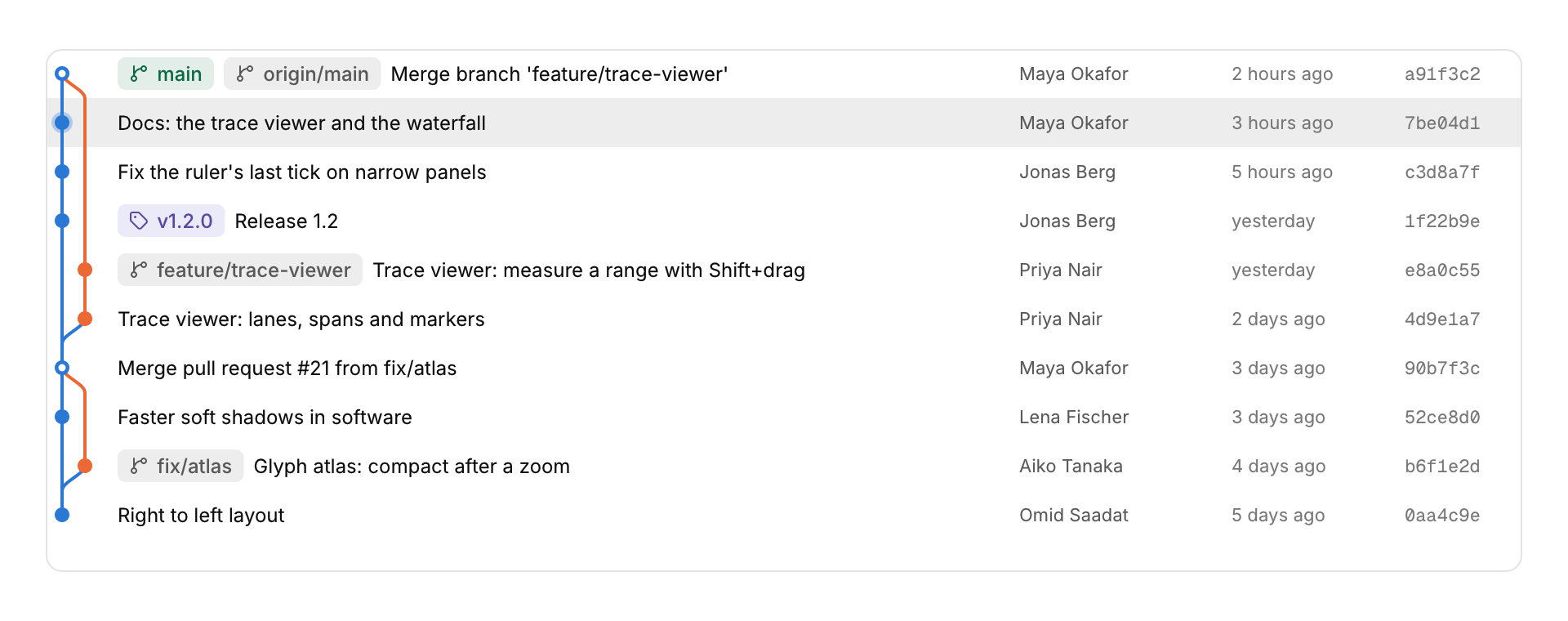
Version history with its branch lanes.
Functions: cui_commit_graph
Usage
/* newest first; each commit names its parents by row */
static const cui_commit log[] = {
    { "a91f3c2", "Merge branch 'feature'", "Maya", "2 hours ago", "main, origin/main", { 1, 2 } },
    { "7be04d1", "Docs", "Maya", "3 hours ago", NULL, { 3, -1 } },
    ...
};
cui_commit_graph(ui, "history", log, count, .selected = &selected, .height = 320);
Each commit's dot sits in its lane, curves join branches and merges, and a merge commit is drawn as a ring. Refs show as badges: local branches green, remote branches gray, and tags violet. The lanes are worked out once when the history changes, so fifty thousand commits take a few milliseconds to lay out and then cost nothing more. Up and Down move the selection, and Enter or a double click reports activated. Below 560 points the author and date are left out.
Keyboard
- Up and Down move the selection, and Enter or a double click reports
activated.
Options of cui_commit_graph
| Option | Type | Default | Description |
|---|---|---|---|
.width | cui_size | Width: CUI_FILL, CUI_FIT, CUI_PX(n) or CUI_PCT(n); unset uses the component's own. | |
.height | float | Height in points; 0 uses the component's own. | |
.selected | int * | the selected row or -1, kept by you; NULL keeps it in the component |
cui_commit
| Field | Type | Description |
|---|---|---|
hash | const char * | the commit id; its first 7 characters are shown |
message | const char * | the first line is shown |
author | const char * | shown in its own column, which a narrow panel leaves out |
date | const char * | already formatted: "2 hours ago", "Mar 3" |
refs | const char * | "main, origin/main, tag: v1.2", may be NULL |
parent | int[2] | row of each parent, -1 for none |
cui_commit_graph_result
| Field | Type | Description |
|---|---|---|
clicked | int | row clicked this frame, or -1 |
activated | int | row double-clicked or chosen with Enter this frame, or -1 |
hovered | int | row under the pointer, or -1 |
Related
- Dependency graph: Nodes and directed edges laid out in layers, for build targets, packages, services or call graphs.
- Keymap: A keyboard with the shortcuts on it.
- Network waterfall: HTTP requests as a table with a timing bar each.
- Schedule picker: A cron schedule edited through plain choices instead of the expression, with the next runs listed.