Components / Developer tools
Dependency graph
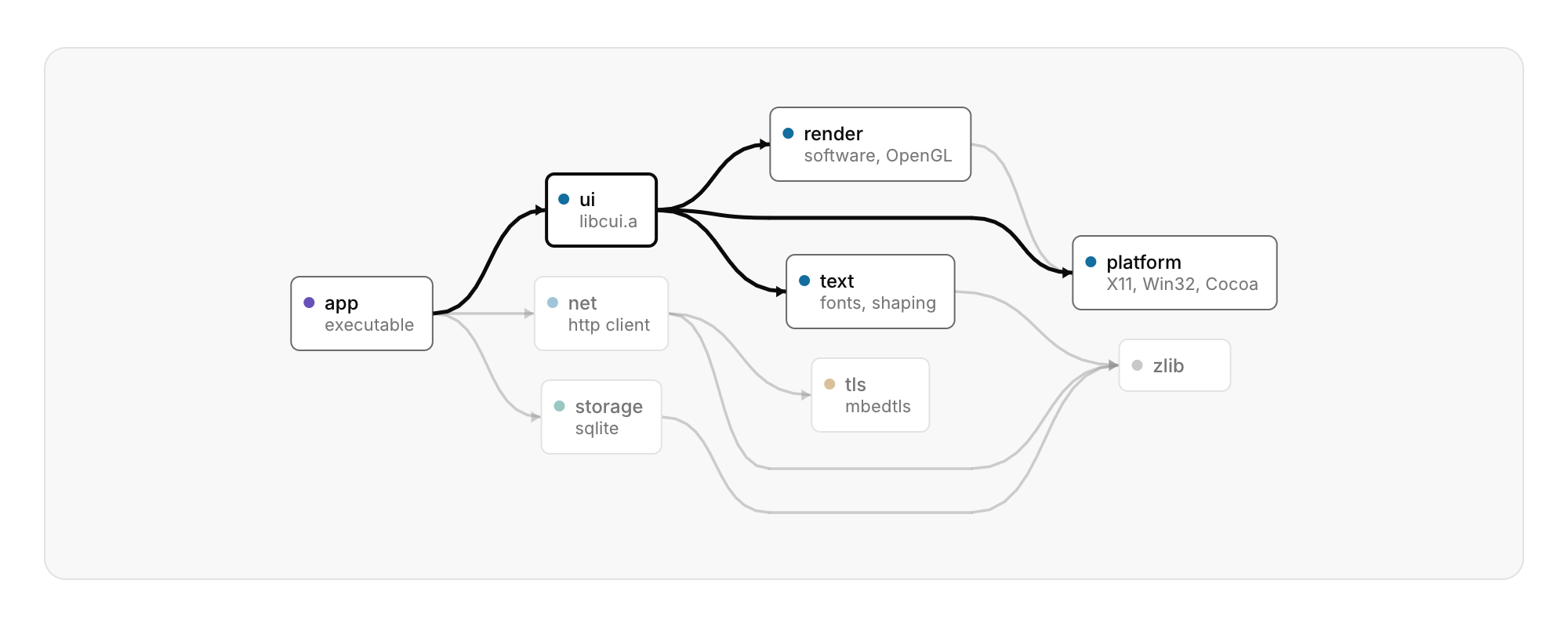
Nodes and directed edges laid out in layers, for build targets, packages, services or call graphs.
Functions: cui_graph_view
Usage
static const cui_graph_node nodes[] = { { "app", "executable", CUI_TONE_VIOLET }, { "ui", "libcui.a" }, { "zlib" } };
static const cui_graph_edge edges[] = { { 0, 1 }, { 1, 2 } };
cui_graph_view(ui, "deps", nodes, 3, edges, 2, .selected = &selected, .height = 340);
Each edge points into a later layer. A cycle is broken for the layout but still drawn. An edge that skips layers is routed between the nodes, not through them, and the order within each layer is chosen to cross fewer edges. Hovering or selecting a node lights up what it depends on and what depends on it, and dims the rest. The wheel zooms around the pointer, dragging pans, a click selects, and a double click activates. With the graph focused, the arrows move along edges or to the neighbour in the same layer, + and - zoom, F fits, and Esc clears. top_down stacks the layers instead of placing them side by side. The layout runs once when the graph changes: 400 nodes with 900 edges take about 20 ms.
Keyboard
- With the graph focused, the arrows move along edges or to the neighbour in the same layer, + and - zoom, F fits, and Esc clears.
Options of cui_graph_view
| Option | Type | Default | Description |
|---|---|---|---|
.width | cui_size | Width: CUI_FILL, CUI_FIT, CUI_PX(n) or CUI_PCT(n); unset uses the component's own. | |
.height | float | Height in points; 0 uses the component's own. | |
.top_down | bool | layers stack from top to bottom instead of running side by side | |
.selected | int * | the selected node or -1, kept by you; NULL keeps it in the component |
cui_graph_node
| Field | Type | Description |
|---|---|---|
label | const char * | A label shown above or beside the control. |
detail | const char * | smaller second line under the label, e.g. the node's kind; NULL for none |
tone | cui_tone | One of CUI_TONE_NEUTRAL, CUI_TONE_INFO, CUI_TONE_SUCCESS, CUI_TONE_WARNING, CUI_TONE_DANGER, CUI_TONE_VIOLET, CUI_TONE_TEAL, CUI_TONE_ROSE or CUI_TONE_ACCENT. |
cui_tone: CUI_TONE_NEUTRAL, CUI_TONE_INFO, CUI_TONE_SUCCESS, CUI_TONE_WARNING, CUI_TONE_DANGER, CUI_TONE_VIOLET, CUI_TONE_TEAL, CUI_TONE_ROSE, CUI_TONE_ACCENT
cui_graph_edge
| Field | Type | Description |
|---|---|---|
from | int | index of the node the arrow starts at |
to | int | index of the node the arrow points to |
cui_graph_result
| Field | Type | Description |
|---|---|---|
clicked | int | node clicked this frame, or -1 |
activated | int | node double-clicked or chosen with Enter this frame, or -1 |
hovered | int | node under the pointer, or -1 |
Related
- Network waterfall: HTTP requests as a table with a timing bar each.
- Commit graph: Version history with its branch lanes.
- Trace viewer: A tracing timeline in the manner of a performance panel.
- Keymap: A keyboard with the shortcuts on it.