Components / Data display
File browser and picker
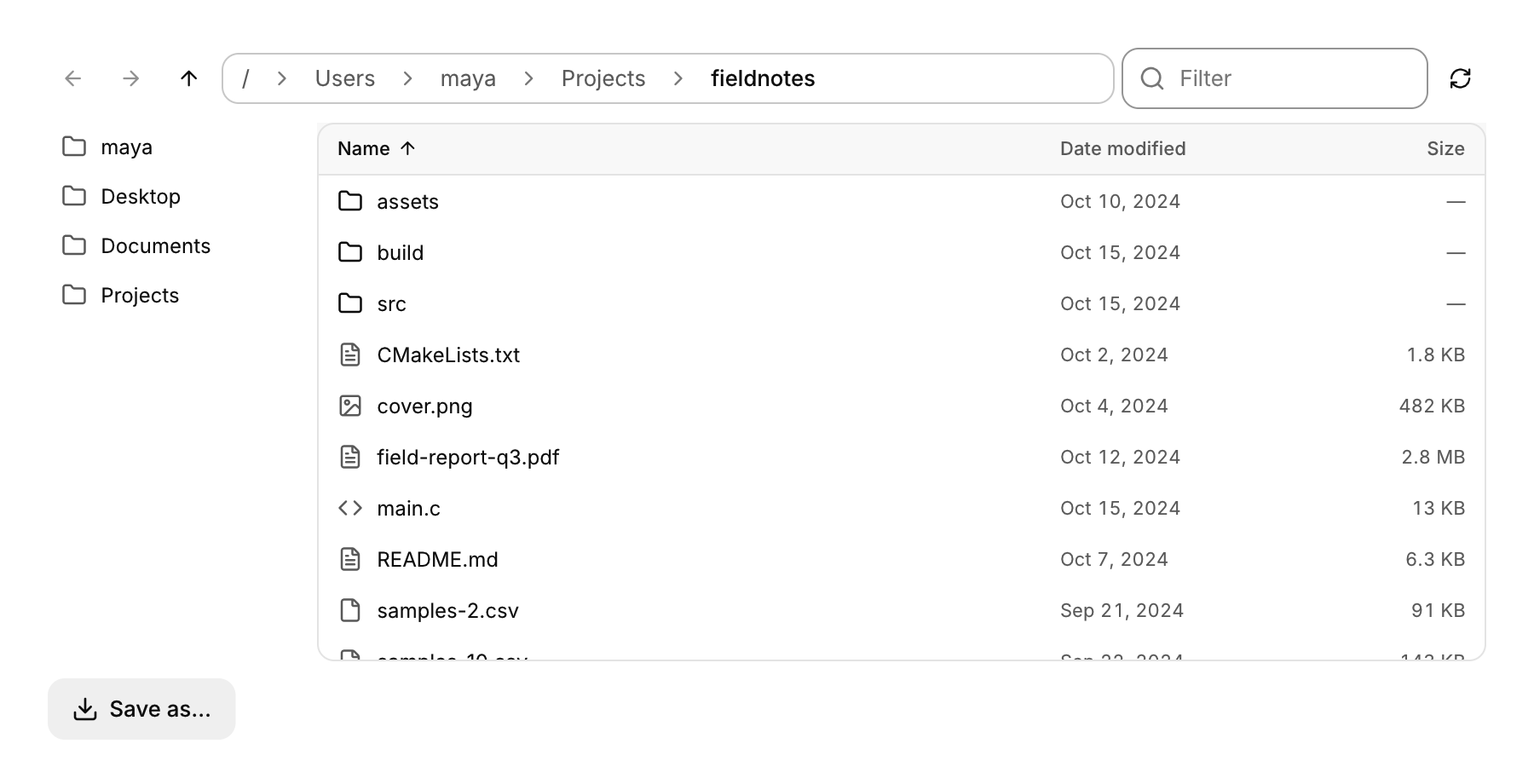
A folder view with sorting and navigation, and the open and save dialogs built from it.
Functions: cui_file_browser, cui_file_picker
Usage
static char folder[1024] = ".";
cui_file_browser_result r = cui_file_browser(ui, "files", folder, sizeof folder, .filter = "*.c;*.h");
if (r.picked) open_document(r.picked);           /* double-click or Enter on a file */

static bool saving;
static char path[1024];
if (cui_button(ui, "Save as...")) saving = true;
if (cui_file_picker(ui, "save", &saving, path, sizeof path, .save = true, .name = "report.pdf")) write_report(path);
A folder's contents with name, date modified and size, folders first and names in natural order (file2 before file10); click a column title to sort by it, again to reverse. Above the list are back, forward and up, a path bar (click a segment to go there, or click the bar and type a path), a filter field and reload; beside it a sidebar of places (home, desktop, documents, downloads and the root, or your own places). Double-click or Enter opens a folder or picks a file (r.picked, a full path), and r.selected tells you what is selected. With the list focused the arrows, Page Up, Page Down, Home and End move the selection, typing letters jumps to the next name that starts with them, Backspace goes up, Alt+Left and Alt+Right go back and forward and F5 reloads. path is yours and the browser writes it as you move around. filter takes patterns like *.png;*.jpg (folders always show), folders_only and hidden change what is listed. Narrow, the date and then the size columns step aside and the sidebar is left out. The local lister shows everything a folder holds, including devices and pipes in places like /dev: check that a picked path is a regular file before reading it, since reading a terminal or a pipe can block.
cui_file_picker puts a browser in a dialog with a footer: Open, or with save a name field and Save (selecting a file fills in its name), or with folders Choose. It returns true once with the chosen path; *open turns false then or on Cancel and Esc. It is drawn by CUI like the rest of the window; cui_app_file_dialog in cui_app.h opens the system's own dialog instead.
A folder is read when you enter it or reload, not every frame, and only the rows in view are built, so a folder of 20,000 files scrolls and filters without slowing down. Reading goes through list, which defaults to cui_fs_list (POSIX or Windows; nothing in a browser build), so the same browser can show a zip file, a remote bucket or an asset database.
Keyboard
- Double-click or Enter opens a folder or picks a file (
r.picked, a full path), andr.selectedtells you what is selected. - With the list focused the arrows, Page Up, Page Down, Home and End move the selection, typing letters jumps to the next name that starts with them, Backspace goes up, Alt+Left and Alt+Right go back and forward and F5 reloads.
- It returns true once with the chosen path;
*openturns false then or on Cancel and Esc.
Options of cui_file_browser
| Option | Type | Default | Description |
|---|---|---|---|
.width | cui_size | fill and 380 | default fill and 380 |
.height | cui_size | fill and 380 | default fill and 380 |
.filter | const char * | patterns that files must match, e.g. "*.png;*.jpg"; folders always show | |
.folders_only | bool | lists folders and leaves the files out | |
.hidden | bool | show hidden files | |
.no_places | bool | the sidebar of places | |
.places | const char *const * | full paths for the sidebar, each shown by its last part; at most 6 | |
.place_count | int | entries in places; with places NULL the sidebar shows home, desktop, documents, downloads and the root | |
.list | cui_file_list_fn | function that lists a folder; set it to browse something other than the local disk | |
.list_user | void * | cui_fs_list, the local disk | passed to list as its first argument; list defaults to cui_fs_list, the local disk |
.max_entries | int | 20,000 | default 20,000 |
Options of cui_file_picker
| Option | Type | Default | Description |
|---|---|---|---|
.title | const char * | "Open", "Save" or "Choose a folder" | default "Open", "Save" or "Choose a folder" |
.save | bool | a name field and Save | |
.folders | bool | choose a folder | |
.start | const char * | the current directory | the folder to start in, default the current directory |
.name | const char * | save: the name to start with | |
.filter | const char * | e.g. "*.png;*.jpg" | |
.filter_label | const char * | e.g. "Images" | |
.list | cui_file_list_fn | `cui_fs_list` | function that lists a folder (the local disk unless set); default cui_fs_list |
.list_user | void * | passed to list as its first argument |
cui_file_browser_result
| Field | Type | Description |
|---|---|---|
picked | const char * | a file double-clicked or Entered, as a full path; valid this frame |
selected | const char * | the selected entry as a full path, or NULL; valid this frame |
navigated | bool | the folder in *path changed |
error | bool | the folder could not be read |
Related
- Dropzone: An area that takes files dropped from the desktop, and can open the system file dialog on a click.
- Button: Starts an action when clicked. It comes in six variants and three sizes, with an optional icon and a loading state.
- Code block: Read-only source code with syntax highlighting, optional line numbers and a copy button.
- Tree table and path bar: A tree with columns, as in a file explorer or a debugger's variables, and a path bar for moving up through folders.