Components / Charts
Bar list and activity rings
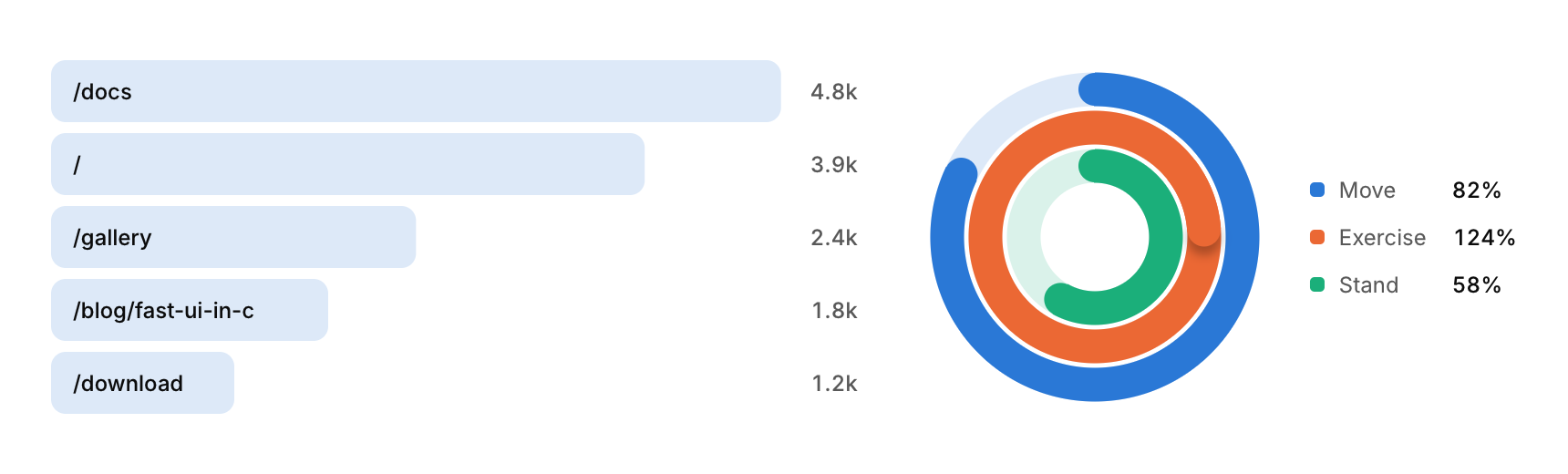
A ranked list with a bar behind each row, and concentric rings that fill toward a goal.
Functions: cui_activity_rings, cui_bar_list
Usage
cui_bar_list(ui, "pages", pages, 5);   /* ranked by value; set keep_order to keep yours */
static const cui_viz_item rings[] = { { "Move", 0.82f }, { "Exercise", 1.24f }, { "Stand", 0.58f } };
cui_activity_rings(ui, "rings", rings, 3, .size = 180, .legend = true);
Bar list rows are keyed by their label: when the values change, the bars grow or shrink and the rows slide to their new rank. max_rows keeps the top few. Ring values are fractions of a goal; past 1 a ring keeps winding, with a shadow under its tip so the overlap reads. legend lists each ring's name and share beside it, outer ring first, and hovering a row picks out its ring; without it, center and caption put a single figure in the middle.
Options of cui_activity_rings
| Option | Type | Default | Description |
|---|---|---|---|
.size | float | Size in points; 0 uses the component's own. | |
.thickness | float | width of each ring in points; 0 uses a tenth of size, at least 8 | |
.center | const char * | large text in the middle of the rings, e.g. a total | |
.caption | const char * | small muted text under center; shown only with center | |
.legend | bool | names and shares beside the rings |
Options of cui_bar_list
| Option | Type | Default | Description |
|---|---|---|---|
.width | cui_size | Width: CUI_FILL, CUI_FIT, CUI_PX(n) or CUI_PCT(n); unset uses the component's own. | |
.format | const char * | A printf format for the values, such as "%.0f ms". | |
.max_rows | int | shows only this many rows from the top; 0 shows all | |
.keep_order | bool | keeps the items in the order given instead of sorting them largest first | |
.color | cui_color | A theme color such as CUI_COLOR_ACCENT, or CUI_RGB(0x7747ff); unset uses the theme's. |
cui_viz_item
| Field | Type | Description |
|---|---|---|
label | const char * | A label shown above or beside the control. |
value | float | the item's amount: its area, length or share, by chart (activity rings: 1 is a full turn) |
color | cui_color | A theme color such as CUI_COLOR_ACCENT, or CUI_RGB(0x7747ff); unset uses the theme's. |
Related
- Scatter and bubble: Points on two axes, with an optional third value as the size of each bubble.
- Sankey: Flows between stages, drawn as ribbons whose width follows the amount.
- Radial gauge: One value on a dial, for dashboards: speed, load, temperature, a score against a goal.
- Funnel, split bar and waffle: Three charts for shares: a funnel for the steps of a conversion, a single bar split into parts, and a waffle of 100 squares.