Components / Feedback
Toast
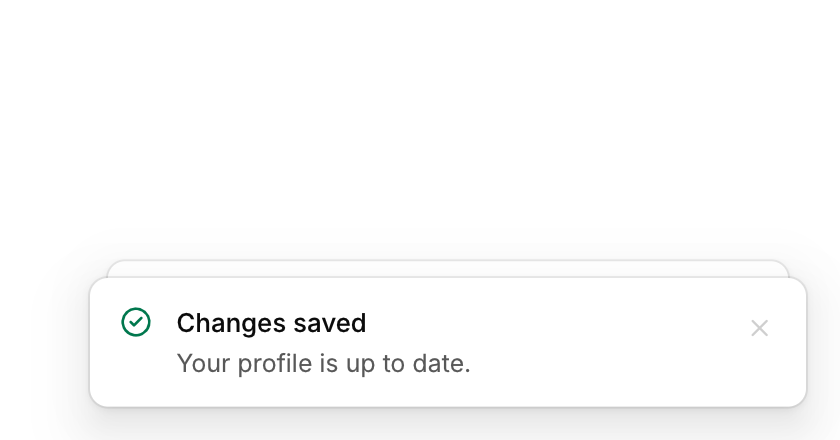
A short message that appears in a corner and goes away by itself, with an optional action.
Functions: cui_toast, cui_toast_action_clicked
Usage
cui_toast(ui, "Changes saved", .tone = CUI_TONE_SUCCESS);
cui_toast(ui, "Upload failed", .description = "The file is larger than 25 MB.", .tone = CUI_TONE_DANGER);
int t = cui_toast(ui, "Message archived", .action = "Undo");
if (cui_toast_action_clicked(ui, t)) undo();
Toasts stack in the bottom right corner. Older toasts tuck behind the newest one; hovering expands the stack and pauses the timers. Drag a toast right to dismiss it: a fling or a long drag carries its speed off the screen, a short one springs back, and dragging left meets rubbery resistance. Options: description, tone, duration (seconds, default 4, negative to keep), action. Use toasts for background events; for the result of a button press, change the button instead.
Keyboard
- A toast's action button takes Tab, and Enter or Space presses it. Toasts never take the focus by themselves.
Options of cui_toast
| Option | Type | Default | Description |
|---|---|---|---|
.description | const char * | A second line of smaller text. | |
.tone | cui_tone | One of CUI_TONE_NEUTRAL, CUI_TONE_INFO, CUI_TONE_SUCCESS, CUI_TONE_WARNING, CUI_TONE_DANGER, CUI_TONE_VIOLET, CUI_TONE_TEAL, CUI_TONE_ROSE or CUI_TONE_ACCENT. | |
.duration | float | 4 | seconds, default 4; negative = until dismissed |
.action | const char * | optional action button label | |
.show_timer | bool | a draining line shows how long the action stays (undo) |
Related
- Undo toast: A toast with an Undo action and a visible timer, for actions that can be taken back.
- Alert: An inline message in a tone of information, success, warning or danger, which can be dismissed.
- Progress, meter, spinner and skeleton: Ways to show waiting and amounts: a progress bar, a meter against a limit, a spinner, a gauge and placeholder shapes for content that is loading.
- Empty state: What to show where there is nothing yet: an icon, a title, a line of help and an action.