Components / Motion
Now playing, waveform and tab bar
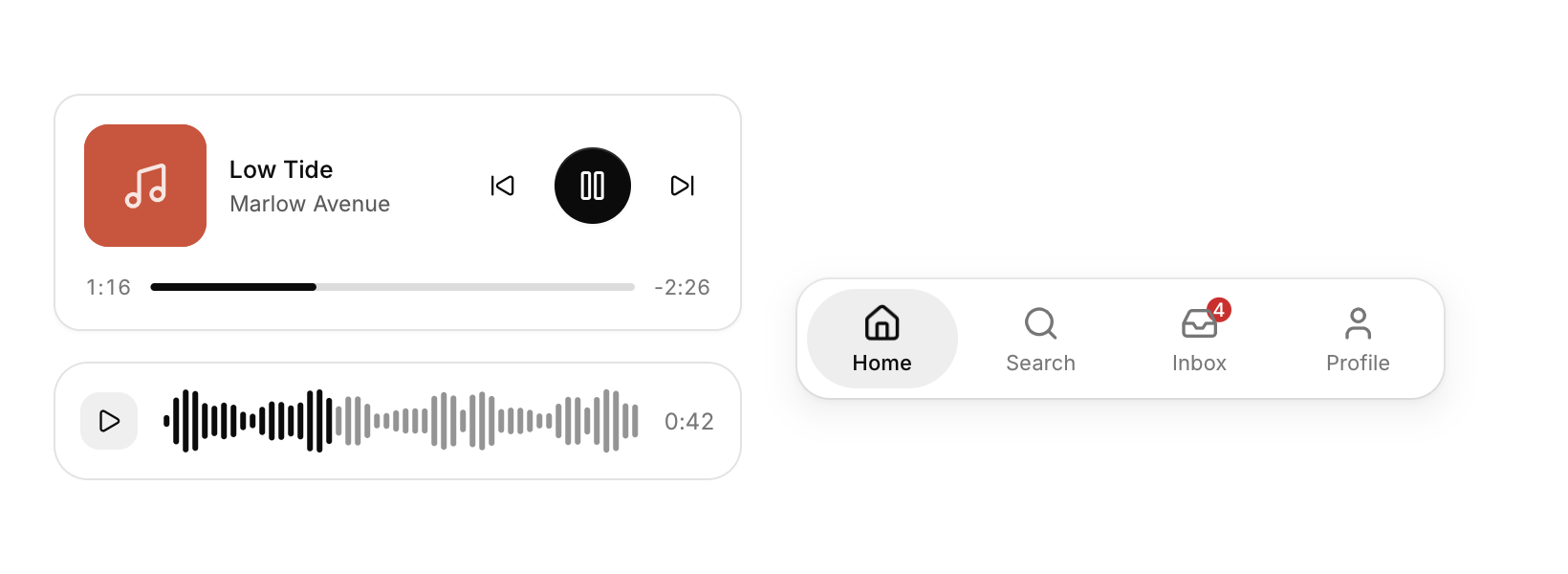
A media player card, an audio waveform to scrub through, and a bottom tab bar for phone layouts.
Functions: cui_now_playing, cui_tab_bar, cui_waveform
Usage
static cui_now_playing np = { "Low Tide", "Marlow Avenue", art, { 0 }, 76, 222, true };
int ev = cui_now_playing(ui, "player", &np);
if (ev & CUI_PLAYER_NEXT) next_track();
if (ev & CUI_PLAYER_SEEK) seek(np.position);

static float progress;
if (cui_waveform(ui, "voice", peaks, 96, &progress, .height = 34)) seek_to(progress);

static int tab;
cui_tab_bar(ui, "tabs", tabs, 4, &tab);
The player shows artwork (a texture, or art_color), a play button that morphs between play and pause, and a scrubber that thickens and shows its knob under the pointer. The time on the right counts down. The waveform resamples its peaks to fit its width; the played part takes the accent color and a ghost shows where a click would seek. The tab bar's pill glides to the selection, and arrow keys move it.
Keyboard
- The tab bar's pill glides to the selection, and arrow keys move it.
Options of cui_now_playing
| Option | Type | Default | Description |
|---|---|---|---|
.width | cui_size | Width: CUI_FILL, CUI_FIT, CUI_PX(n) or CUI_PCT(n); unset uses the component's own. | |
.compact | bool | smaller artwork and padding, and no previous button |
Options of cui_tab_bar
| Option | Type | Default | Description |
|---|---|---|---|
.width | cui_size | Width: CUI_FILL, CUI_FIT, CUI_PX(n) or CUI_PCT(n); unset uses the component's own. | |
.labels_on_selected_only | bool | only the selected tab shows its label; the others show just their icon |
Options of cui_waveform
| Option | Type | Default | Description |
|---|---|---|---|
.width | cui_size | Width: CUI_FILL, CUI_FIT, CUI_PX(n) or CUI_PCT(n); unset uses the component's own. | |
.height | float | Height in points; 0 uses the component's own. | |
.bar | float | 3 | width of each bar in points, default 3 |
.gap | float | Space between the items, in points. | |
.color | cui_color | A theme color such as CUI_COLOR_ACCENT, or CUI_RGB(0x7747ff); unset uses the theme's. |
cui_now_playing
| Field | Type | Description |
|---|---|---|
title | const char * | name of the track, in medium weight |
artist | const char * | shown under the title |
art | cui_texture | artwork texture; 0 shows a tile in art_color with a note icon |
art_color | cui_color | color of the tile behind (or in place of) the artwork |
position | float | seconds played; written when the user seeks |
duration | float | length of the track in seconds |
playing | bool | shows pause instead of play; the play button flips it |
cui_tab_bar_item
| Field | Type | Description |
|---|---|---|
icon | const char * | An icon: a CUI_ICON_* constant, or a string from another icon font. |
label | const char * | A label shown above or beside the control. |
badge | int | a count on the icon ("9+" above 9); 0 for none |
Related
- Control tiles: Large toggle tiles for quick settings such as Wi-Fi or Do not disturb.
- Dock: A row of icons that grow under the pointer, as in a desktop dock.
- Loaders: Animated indicators for work in progress, in five styles.
- Gradient text and spotlight cards: Text filled with a gradient, and a card with a glow that follows the pointer.