Components / Developer tools
Feature flags
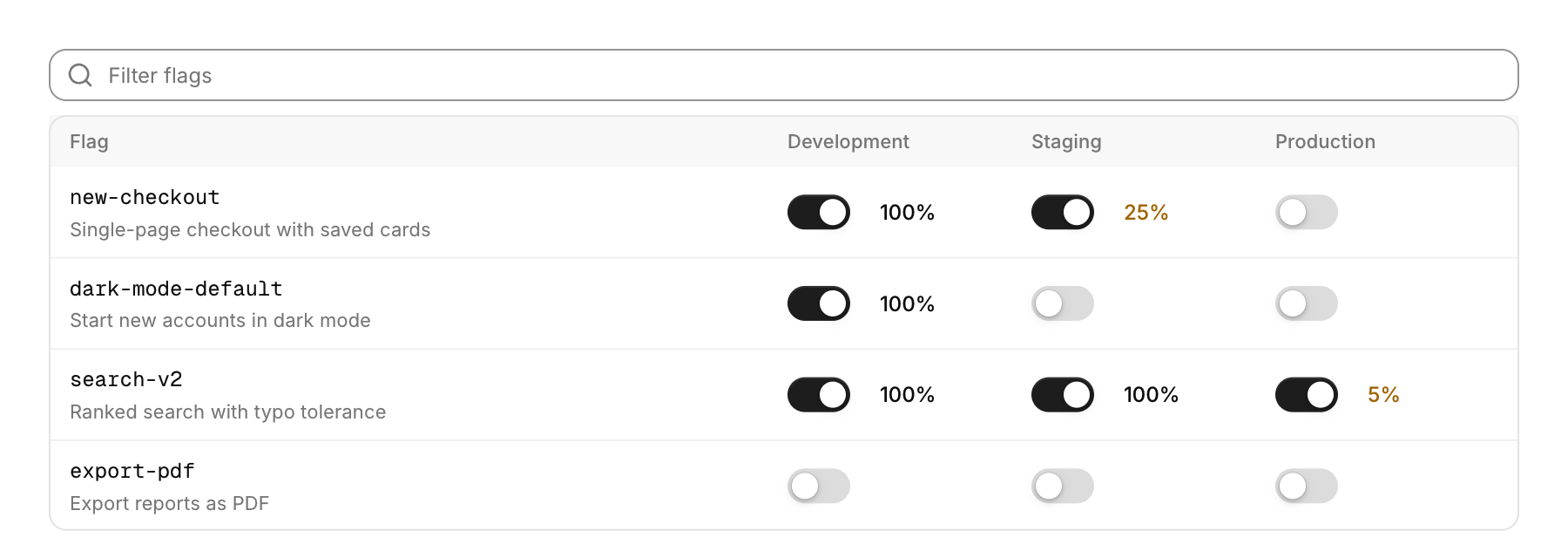
Flags against environments, edited in place.
Functions: cui_feature_flags
Usage
static cui_feature_flag flags[] = {
    { "new-checkout", "Single-page checkout", { true, true, false }, { 0, 25, 0 } },   /* on in two; a quarter of staging */
};
static const char *envs[] = { "Development", "Staging", "Production" };
cui_feature_flags_result r = cui_feature_flags(ui, "flags", flags, 1, envs, 3);
if (r.flag >= 0) save_flag(&flags[r.flag], r.env);
Each environment has a switch, and while a flag is on it also shows the share of users it reaches. A click on the share opens a slider with presets, and a share under 100% shows in amber. A field filters by key or description. On a phone, or when the columns do not fit, one environment shows at a time, picked above the list. The result names the flag and the environment that changed this frame. With height the list scrolls.
Keyboard
- Tab moves through the switches and the share buttons, and Enter or Space flips the focused switch or opens the share popover, which Esc closes.
Options of cui_feature_flags
| Option | Type | Default | Description |
|---|---|---|---|
.width | cui_size | Width: CUI_FILL, CUI_FIT, CUI_PX(n) or CUI_PCT(n); unset uses the component's own. | |
.height | float | fits the flags | default fits the flags |
cui_feature_flag
| Field | Type | Description |
|---|---|---|
key | const char * | the flag's name, in the code font; the filter field searches it |
description | const char * | A second line of smaller text. |
on | bool[CUI_FLAG_ENVS] | the flag's switch in each environment, in the order of envs |
rollout | int[CUI_FLAG_ENVS] | percent of users while on; 0 and 100 mean everyone |
cui_feature_flags_result
| Field | Type | Description |
|---|---|---|
flag | int | changed this frame, or -1 |
env | int | changed this frame, or -1 |
Related
- API explorer: The endpoints of an API grouped by tag, each opening to show its parameters.
- Blame: Source with who last changed each line.
- Coverage: Test coverage as a tree built from the files' paths.
- Time histogram: Event counts over time, stacked by series, as above a log search, with a legend that shows each series' total.