Components / Data display
Code editor
An editable code field with syntax highlighting, for shader editors, script consoles and config files.
Functions: cui_code_editor, cui_code_editor_goto
Usage
static char src[64 * 1024] = "void main() {\n}\n";   /* yours: edited in place, NUL terminated */

cui_code_editor_result r = cui_code_editor(ui, "shader", src, sizeof src, .lang = "c", .height = 360,
                                           .placeholder = "Write a fragment shader");
if (r.changed) recompile(src);
if (r.refused) cui_toast(ui, "The shader is too long", .tone = CUI_TONE_WARNING);
cui_textf(ui, "Ln %d, Col %d", r.line, r.column);

if (error_line) cui_code_editor_goto(ui, "shader", error_line, error_column);   /* jump to a compile error */
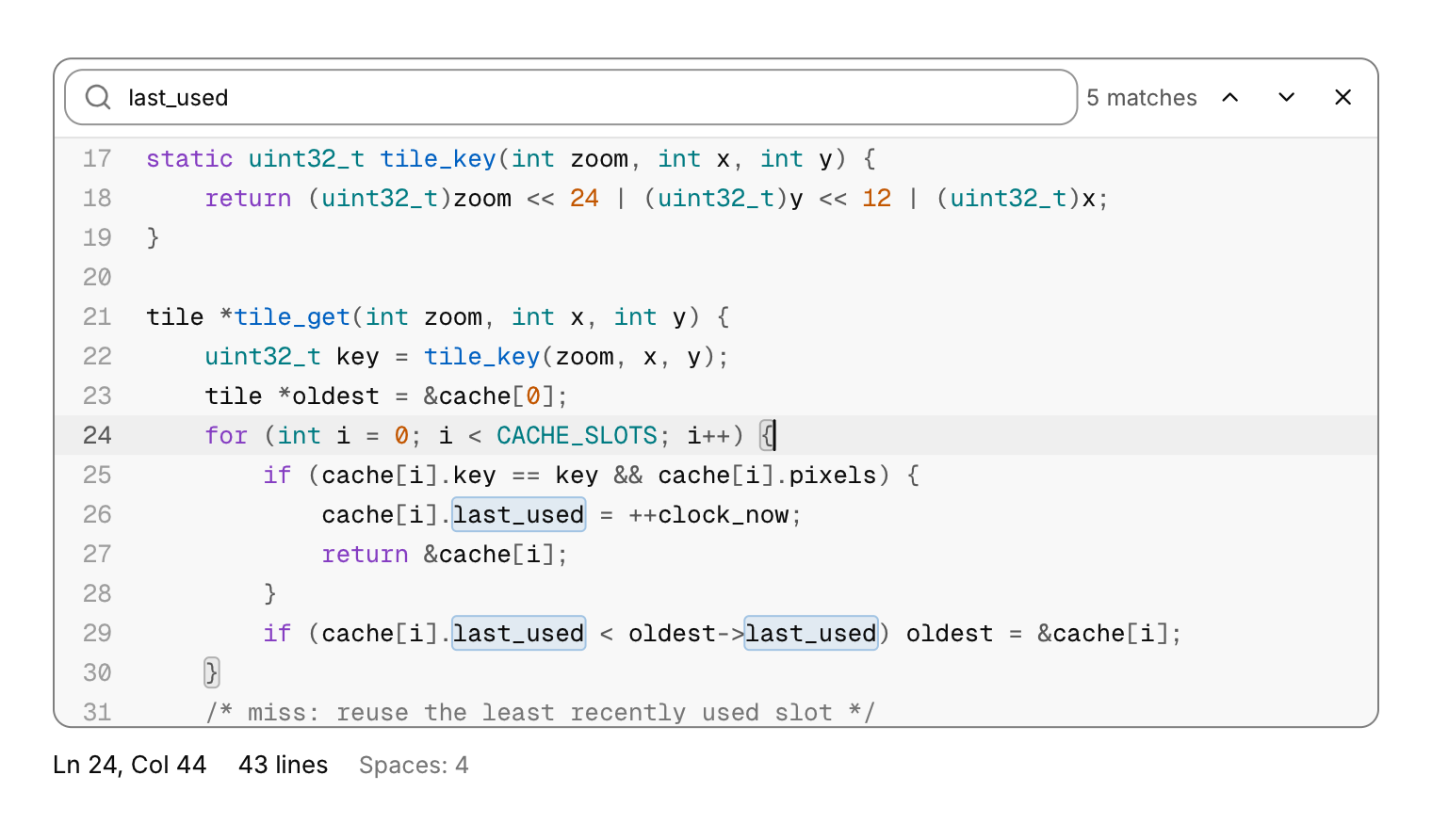
Editable code for shader editors, script consoles and config files, with the code block's highlighting (C, C++, JavaScript, TypeScript, Python, Rust, Go, JSON and shell, or plain text with no lang), its surface and its monospace font. You own the text: a NUL terminated buffer and its capacity, edited in place. An edit that would not fit is refused whole, never cut in half, and the result reports it (refused) so you can say so. The result also gives the caret's line and column (columns count a tab to its stop), the selection as byte offsets, the line count, whether the text changed this frame and, with the find bar open, how many matches there are and which one is selected. A gutter on the left numbers the lines and marks the caret's line, which also gets a quiet band across the editor; the bracket beside the caret and its partner are boxed. Lines never wrap: long ones scroll sideways under the gutter, which stays, and a hairline marks the gutter's edge while the code is scrolled. Only the lines in view are tokenized and drawn, so a file of tens of thousands of lines scrolls and types like a short one. .read_only keeps selection, copy, find and go to line but refuses every edit; .placeholder shows while the text is empty; .tab_size (default 4) and .use_tabs choose how indentation is typed; .height defaults to 320 points and a negative height fills the space. cui_code_editor_goto puts the caret at a line and column, cui_code_editor_select selects bytes and cui_code_editor_find opens the find bar with a query; each focuses the editor and scrolls there on its next frame (call them from the same id scope).
Mouse: click places the caret, Shift+click extends, drag selects (the view scrolls when the pointer leaves it), double-click selects a word, triple-click or a click in the gutter selects a line, and dragging after a double or triple click extends by words or lines. The wheel scrolls, Shift+wheel or a sideways scroll goes sideways, and the thin scrollbars that appear can be dragged. Keys, with the editor focused (on a Mac, Cmd for Ctrl and Option for the word moves):
- Arrows move; Ctrl+Left and Ctrl+Right move by word; Up and Down keep the column; Page Up and Page Down move by a screen; Home goes to the first character of the line, then to column 0; End to the end of the line; Ctrl+Home and Ctrl+End to the start and end of the text. Shift with any of them extends the selection; Ctrl+A selects everything.
- Ctrl+C, Ctrl+X and Ctrl+V copy, cut and paste; without a selection, copy and cut take the whole line. Ctrl+Z undoes, Ctrl+Shift+Z or Ctrl+Y redoes; typing within a second is one step, and Enter, paste, cut and indentation are steps of their own.
- Tab inserts spaces to the next tab stop; with a selection, Tab and Shift+Tab indent and outdent every selected line (Shift+Tab also outdents the caret's line). Backspace in the indentation goes back to the previous stop.
- Enter starts the new line at this line's indentation, one level deeper after an opening bracket in C-like languages or a colon in Python; between a pair of brackets the closing one moves to a line of its own. A closing brace typed on a blank line steps back a level.
- Ctrl+F opens the find bar with the selected text: the matches are boxed, Enter and Shift+Enter (or the arrows) go to the next and previous one, wrapping around, and the count shows which one is selected. Case is ignored. Ctrl+G opens go to line (
42or42:7). Esc closes the bar and returns to the code. - Esc in the code closes the find bar, or else clears the selection; with neither, it lets the next Tab move focus out of the editor, since Tab otherwise types.
Keyboard
- Mouse: click places the caret, Shift+click extends, drag selects (the view scrolls when the pointer leaves it), double-click selects a word, triple-click or a click in the gutter selects a line, and dragging after a double or triple click extends by words or lines.
- The wheel scrolls, Shift+wheel or a sideways scroll goes sideways, and the thin scrollbars that appear can be dragged.
- Keys, with the editor focused (on a Mac, Cmd for Ctrl and Option for the word moves):
- Arrows move; Ctrl+Left and Ctrl+Right move by word; Up and Down keep the column; Page Up and Page Down move by a screen; Home goes to the first character of the line, then to column 0; End to the end of the line; Ctrl+Home and Ctrl+End to the start and end of the text.
- Shift with any of them extends the selection; Ctrl+A selects everything.
- Ctrl+C, Ctrl+X and Ctrl+V copy, cut and paste; without a selection, copy and cut take the whole line.
- Ctrl+Z undoes, Ctrl+Shift+Z or Ctrl+Y redoes; typing within a second is one step, and Enter, paste, cut and indentation are steps of their own.
- Tab inserts spaces to the next tab stop; with a selection, Tab and Shift+Tab indent and outdent every selected line (Shift+Tab also outdents the caret's line).
- Backspace in the indentation goes back to the previous stop.
- Enter starts the new line at this line's indentation, one level deeper after an opening bracket in C-like languages or a colon in Python; between a pair of brackets the closing one moves to a line of its own.
- Ctrl+F opens the find bar with the selected text: the matches are boxed, Enter and Shift+Enter (or the arrows) go to the next and previous one, wrapping around, and the count shows which one is selected.
- Ctrl+G opens go to line (
42or42:7). - Esc closes the bar and returns to the code.
- Esc in the code closes the find bar, or else clears the selection; with neither, it lets the next Tab move focus out of the editor, since Tab otherwise types.
Options of cui_code_editor
| Option | Type | Default | Description |
|---|---|---|---|
.lang | const char * | as cui_code_block: "c", "cpp", "js", "ts", "python", "rust", "go", "json", "shell"; "text" for none | |
.width | cui_size | fill | default fill |
.height | float | 320 | default 320; negative fills the space |
.size | float | 13 | font size, default 13 |
.tab_size | int | 4 | columns per indentation level, default 4 |
.use_tabs | bool | indent with tab characters instead of spaces | |
.read_only | bool | Shows the value but does not let it be edited. | |
.no_line_numbers | bool | hides the gutter of line numbers | |
.autofocus | bool | Takes the keyboard focus when it first appears. | |
.placeholder | const char * | shown while the text is empty | |
.marks | const cui_text_mark * | ranges to highlight (search results, regex matches), sorted by start | |
.mark_count | int | number of marks |
cui_code_editor_result
| Field | Type | Description |
|---|---|---|
changed | bool | the text changed this frame |
refused | bool | an edit did not fit in the capacity and was dropped |
focused | bool | the editor or its find bar has the keyboard |
cursor | int | caret and the other end of the selection, byte offsets |
anchor | int | caret and the other end of the selection, byte offsets |
line | int | the caret, 1 based; columns count tabs to their stop |
column | int | the caret, 1 based; columns count tabs to their stop |
line_count | int | lines, and bytes of text |
length | int | lines, and bytes of text |
bracket | int | the bracket beside the caret and its partner, byte offsets, or -1 |
bracket_match | int | the bracket beside the caret and its partner, byte offsets, or -1 |
find_matches | int | with the find bar open: matches, and which one is selected (1 based, 0 none) |
find_index | int | with the find bar open: matches, and which one is selected (1 based, 0 none) |
Related
- Code block: Read-only source code with syntax highlighting, optional line numbers and a copy button.
- Toast: A short message that appears in a corner and goes away by itself, with an optional action.
- Diff viewer: Compares two versions of a text line by line.
- Markdown view: Renders markdown text as native content: headings, lists, tables, code, task lists and links.