Components / AI interfaces
Suggestions, response actions and the context meter
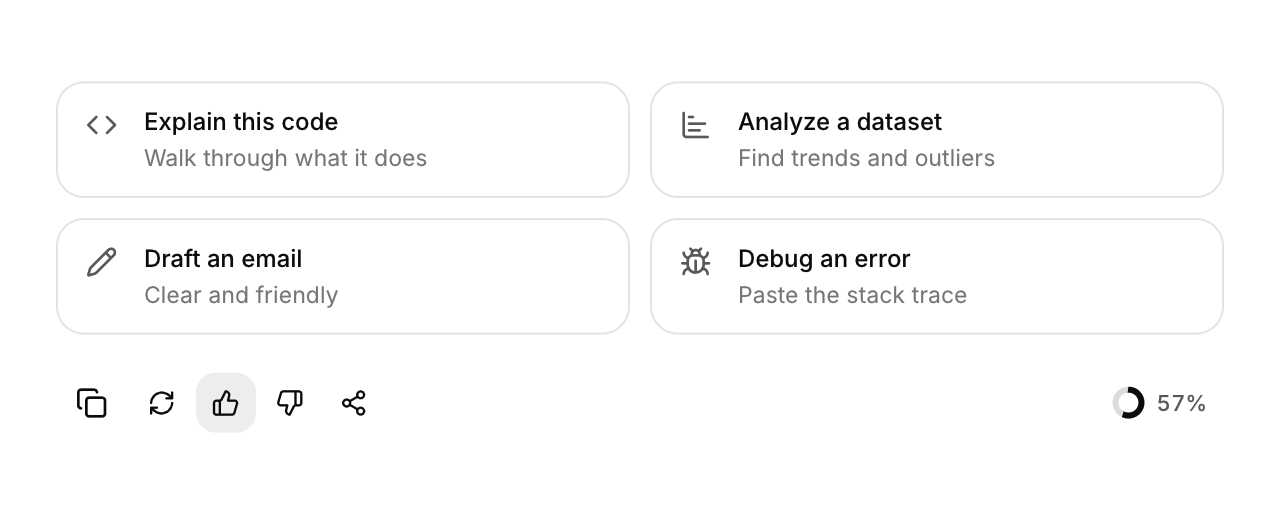
Prompt suggestions to start from, the actions under a response, and a ring that shows how full the context is.
Functions: cui_context_meter, cui_prompt_suggestions, cui_response_actions
Usage
static const cui_prompt_suggestion suggestions[] = {                      /* icon, title, detail */
    { CUI_ICON_PENCIL, "Draft a release note", "From the merged pull requests" }, /* ... */
};
static int vote;                                                          /* 1 up, -1 down, 0 none */
static const cui_viz_item parts[] = { { "System", 1200 }, { "Messages", 46000 }, { "Files", 31000 } };

int pick = cui_prompt_suggestions(ui, "start", suggestions, 4);           /* .columns = 1 for a sidebar */
int act = cui_response_actions(ui, "actions", .copy_text = answer, .vote = &vote);
if (act & CUI_RESPONSE_REGENERATE) regenerate();
cui_context_meter(ui, "ctx", used_tokens, 200000, .parts = parts, .part_count = 3);
The response actions copy (the icon turns into a check), regenerate, vote and share. The context meter's ring turns amber past 80% and red past 95%; hovering it shows a split of what fills the context.
cui_prompt_suggestions returns the index of the card that was clicked, or -1. The grid shows columns cards in a row (2), and fewer when a card would be narrower than 200 points.
cui_response_actions returns flags for what was clicked this frame: CUI_RESPONSE_COPY, CUI_RESPONSE_REGENERATE, CUI_RESPONSE_UP, CUI_RESPONSE_DOWN and CUI_RESPONSE_SHARE. Copying is done for you from copy_text, and without it there is no copy button. vote points at your int: the thumbs show it and write it, and a click on the thumb that is on clears it.
cui_context_meter returns nothing. Each part is a label, an amount and an optional color; the card shown on hover adds a "Free" part for the rest and names the unit "tokens" unless unit is set.
Keyboard
- Tab moves through the suggestions and the response actions, and Enter or Space presses the focused one.
Options of cui_context_meter
| Option | Type | Default | Description |
|---|---|---|---|
.parts | const cui_viz_item * | what fills the context (label, amount, color), for the breakdown on hover | |
.part_count | int | number of parts | |
.unit | const char * | A unit shown after the value. |
Options of cui_prompt_suggestions
| Option | Type | Default | Description |
|---|---|---|---|
.columns | int | 2 | cards per row, default 2 |
Options of cui_response_actions
| Option | Type | Default | Description |
|---|---|---|---|
.copy_text | const char * | the text the copy button copies; NULL leaves the button out | |
.vote | int * | 1 thumbs up, -1 thumbs down, 0 none: shown on the buttons and updated on a click | |
.no_regenerate | bool | hides the regenerate button | |
.no_share | bool | hides the share button |
cui_prompt_suggestion
| Field | Type | Description |
|---|---|---|
icon | const char * | An icon: a CUI_ICON_* constant, or a string from another icon font. |
title | const char * | the card's heading, in medium weight |
detail | const char * | smaller muted text under the title; may be NULL |
Related
- Voice orb: An animated orb for voice modes that shows listening, thinking and speaking.
- Composer and model picker: The message box of a chat, with attachments, send and stop, and a menu for choosing the model.
- Sources and citations: Citations inside an answer and the list of sources they point to.
- Agent plan and status: The steps an agent is working through, and a pill that says what it is doing now.